¶ What is a U1 error code?
To reduce maintenance difficulty and improve user experience, U1 is equipped with an error pop-up notification system.
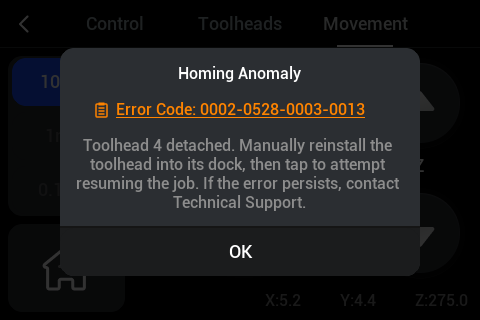
When an abnormal condition is detected, a message window automatically appears on the screen displaying the corresponding error code.
Users can search the error code on the Snapmaker Wiki to find its possible causes and solutions to restore normal printer operation.
If the issue persists, record the error code and contact Snapmaker Technical Support for timely assistance.
Example: 0002-0528-0003-0013 indicates a homing anomaly.
¶ U1 error code structure
Each error code consists of four groups of four digits, representing the following meanings:
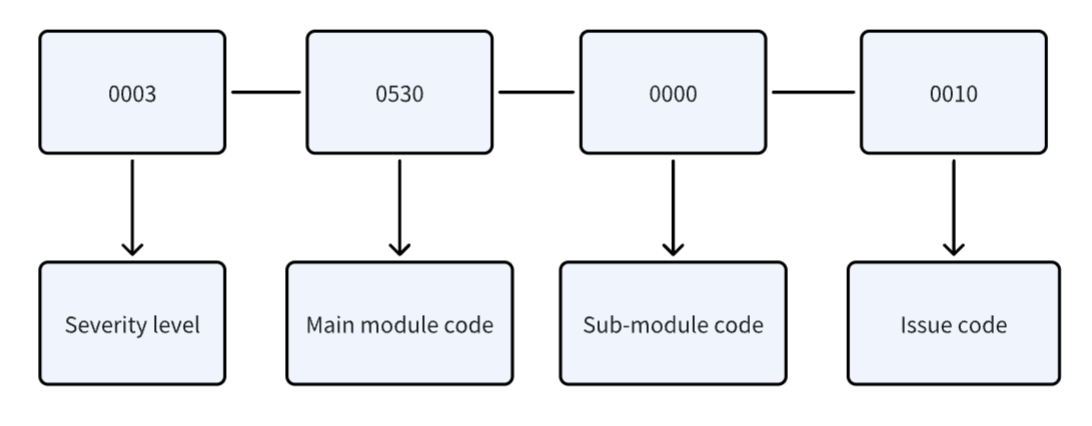
¶ 1. Severity level
| Code | Level | Device safety risk | Risk of burnout, short circuit, overheating, or fire? | Print task integrity | Will it cause print failure? | User intervention | Is user action required to recover? |
|---|---|---|---|---|---|---|---|
| 0000 | Invalid | No | No | No | No | Not required | Not required |
| 0001 | Notice | No | No | No | No | Partially required | Partially required |
| 0002 | Warning | Medium–low risk | No | Yes (print paused) | Yes (print paused) | Required | Required |
| 0003 | Error | High | Yes | Yes (print stopped) | Yes (print stopped) | Required | Required |
¶ 2. Main module code
| Motion control | Toolhead | Filament feeder | Heated bed | Chamber temperature detection | Homing failure | G-code | Detection/calibration | Slicing file exception |
|---|---|---|---|---|---|---|---|---|
| 0522 | 0523 | 0525 | 0526 | 0527 | 0528 | 0529 | 0530 | 0531 |
¶ 3. Sub-module code
Used to differentiate between submodules or subprocesses within the same main category.
¶ 4. Issue code
Represents the specific type of exception or failure.
¶ How to use U1 error codes
Enter the corresponding error code in the Wiki search bar to find the related troubleshooting article.
The article will explain the cause, diagnostic steps, and solution for that specific error.
If no dedicated article is available yet, refer to the detailed error list below or contact Snapmaker Technical Support for further assistance.

Important notes:
(1) Some abnormal states may have complex root causes. The displayed error code might not always represent the actual fault source.
(2) If the printer cannot be restored after following the suggested troubleshooting steps, or if the code shown does not match the real situation, please contact Snapmaker Technical Support for targeted guidance.
(3) Certain error states are still under refinement, as related evaluation methods are being optimized.
It is recommended to keep your firmware up to date to ensure accurate and complete error reporting.
¶ U1 error code reference table
¶ 0522 Motion control
| Error Code | Error Title | Error Details | Troubleshooting Article |
|---|---|---|---|
| 0003-0522-0000-0000 | System Anomaly | See anomaly details. Contact technical support. | Error Codes 0003-0522-0000-0000 / 0003-0522-0000-0002 |
| 0003-0522-0000-0001 | System Anomaly | Contact technical support. | — |
| 0003-0522-0000-0002 | System Anomaly | Printer stopped. See anomaly details. Contact technical support. | Error Codes 0003-0522-0000-0000 / 0003-0522-0000-0002 |
| 0003-0522-0000-0003 | System Failed to Start | Configuration load anomaly. Contact technical support or restore factory settings. | — |
| 0003-0522-0000-0004 | System Failed to Start | Configuration load anomaly. Contact technical support or restore factory settings. | — |
| 0003-0522-0000-0005 | System Failed to Start | Communication protocol load anomaly. Contact technical support or update firmware. | — |
| 0003-0522-0000-0006 | System Failed to Start | Host MCU connection failed. Contact technical support. | — |
| 0003-0522-0001-0006 | System Failed to Start | Mainboard MCU connection failed. Contact technical support. | — |
| 0003-0522-0002-0006 | System Failed to Start | Toolhead 1 MCU connection failed. Power off printer, check toolhead cable, then restart printer. If issue persists, contact technical support. | U1 toolhead disconnected |
| 0003-0522-0003-0006 | System Failed to Start | Toolhead 2 MCU connection failed. Power off printer, check toolhead cable, then restart printer. If issue persists, contact technical support. | U1 toolhead disconnected |
| 0003-0522-0004-0006 | System Failed to Start | Toolhead 3 MCU connection failed. Power off printer, check toolhead cable, then restart printer. If issue persists, contact technical support. | U1 toolhead disconnected |
| 0003-0522-0005-0006 | System Failed to Start | Toolhead 4 MCU connection failed. Power off printer, check toolhead cable, then restart printer. If issue persists, contact technical support. | U1 toolhead disconnected |
| 0003-0522-0100-0006 | System Failed to Start | No toolhead detected. Please contact technical support. | U1 no toolhead detected |
| 0003-0522-0000-0007 | System Failed to Start | Abnormal MCU connection. Contact technical support. | — |
| 0003-0522-0000-0008 | System Anomaly | Host MCU connection interrupted. Contact technical support. | — |
| 0003-0522-0001-0008 | System Anomaly | Mainboard MCU connection interrupted. Contact technical support. | — |
| 0003-0522-0002-0008 | System Anomaly | Toolhead 1 MCU connection interrupted. Power off printer, check Toolhead 1 cable, then restart to resume operation. | U1 toolhead disconnected |
| 0003-0522-0003-0008 | System Anomaly | Toolhead 2 MCU connection interrupted. Power off printer, check Toolhead 2 cable, then restart to resume operation. | U1 toolhead disconnected |
| 0003-0522-0004-0008 | System Anomaly | Toolhead 3 MCU connection interrupted. Power off printer, check Toolhead 3 cable, then restart to resume operation. | U1 toolhead disconnected |
| 0003-0522-0005-0008 | System Anomaly | Toolhead 4 MCU connection interrupted. Power off printer, check Toolhead 4 cable, then restart to resume operation. | U1 toolhead disconnected |
| 0003-0522-0000-0009 | Sensor Anomaly | Accelerometer storage anomaly. Try powering off and restarting to resume. If the problem recurs, contact technical support. | — |
| 0003-0522-0000-0010 | Sensor Anomaly | Accelerometer failed to obtain valid device ID. Try powering off and restarting to resume. If the problem recurs, contact technical support. | — |
| 0003-0522-0000-0011 | Motor Driver Anomaly | Motor driver anomaly. See anomaly details. Contact technical support. | — |
| 0003-0522-0000-0012 | Axis Movement Anomaly | Tap Home first, then move the X axis. | — |
| 0003-0522-0001-0012 | Axis Movement Anomaly | Tap Home first, then move the Y axis. | — |
| 0003-0522-0002-0012 | Axis Movement Anomaly | Tap Home first, then move the Z axis. | — |
| 0003-0522-0000-0013 | Axis Movement Anomaly | X-axis movement exceeded travel limit. | U1 X/Y movement exceeded travel limit |
| 0003-0522-0001-0013 | Axis Movement Anomaly | Y-axis movement exceeded travel limit. | U1 X/Y movement exceeded travel limit |
| 0003-0522-0002-0013 | Axis Movement Anomaly | Z-axis movement exceeded travel limit. | — |
| 0003-0522-0000-0014 | Sensor Anomaly | ADC sensor configuration exceeded limit. System has shut down for protection. Export printer logs and contact technical support. | — |
| 0003-0522-0000-0015 | Temperature Anomaly | Heating module failed to heat up normally. System has shut down for protection. Export printer logs and contact technical support. | — |
| 0003-0522-0000-0016 | System Anomaly | Host MCU control timed out. System has shut down for protection. Contact technical support. | — |
| 0003-0522-0001-0016 | System Anomaly | Mainboard MCU control timed out. System has shut down for protection. Contact technical support. | — |
| 0003-0522-0002-0016 | System Anomaly | Toolhead 1 MCU control timed out. System has shut down for protection. Power off printer, check Toolhead 1 cable, then restart to resume operation. | — |
| 0003-0522-0003-0016 | System Anomaly | Toolhead 2 MCU control timed out. System has shut down for protection. Power off printer, check Toolhead 2 cable, then restart to resume operation. | — |
| 0003-0522-0004-0016 | System Anomaly | Toolhead 3 MCU control timed out. System has shut down for protection. Power off printer, check Toolhead 3 cable, then restart to resume operation. | — |
| 0003-0522-0005-0016 | System Anomaly | Toolhead 4 MCU control timed out. System has shut down for protection. Power off printer, check Toolhead 4 cable, then restart to resume operation. | — |
| 0003-0522-0000-0017 | System Anomaly | Mainboard MCU detected power-off signal. System has shut down for protection. Contact technical support. | U1 false power-off signal triggered |
| 0003-0522-0001-0017 | System Anomaly | Toolhead 1 MCU detected power-off signal. System has shut down for protection. Contact technical support. | U1 false power-off signal triggered |
| 0003-0522-0002-0017 | System Anomaly | Toolhead 2 MCU detected power-off signal. System has shut down for protection. Contact technical support. | U1 false power-off signal triggered |
| 0003-0522-0003-0017 | System Anomaly | Toolhead 3 MCU detected power-off signal. System has shut down for protection. Contact technical support. | U1 false power-off signal triggered |
| 0003-0522-0004-0017 | System Anomaly | Toolhead 4 MCU detected power-off signal. System has shut down for protection. Contact technical support. | U1 false power-off signal triggered |
¶ 0523 Toolhead
| Error Code | Error Title | Error Details | Troubleshooting Article |
|---|---|---|---|
| 0002-0523-0000-0000 | Filament Anomaly | Filament runout detected in Toolhead 1. Try reloading filament, then tap the play button to resume the print job. | U1 false filament runout detection 0002-0523-0000-0000 |
| 0002-0523-0001-0000 | Filament Anomaly | Filament runout detected in Toolhead 2. Try reloading filament, then tap the play button to resume the print job. | U1 false filament runout detection 0002-0523-0000-0000 |
| 0002-0523-0002-0000 | Filament Anomaly | Filament runout detected in Toolhead 3. Try reloading filament, then tap the play button to resume the print job. | U1 false filament runout detection 0002-0523-0000-0000 |
| 0002-0523-0003-0000 | Filament Anomaly | Filament runout detected in Toolhead 4. Try reloading filament, then tap the play button to resume the print job. | U1 false filament runout detection 0002-0523-0000-0000 |
| 0003-0523-0000-0001 | Nozzle Temperature Anomaly | Toolhead 1 nozzle temperature insufficient. Nozzle extrusion temperature must be above 170°C. | |
| 0003-0523-0001-0001 | Nozzle Temperature Anomaly | Toolhead 2 nozzle temperature insufficient. Nozzle extrusion temperature must be above 170°C. | |
| 0003-0523-0002-0001 | Nozzle Temperature Anomaly | Toolhead 3 nozzle temperature insufficient. Nozzle extrusion temperature must be above 170°C. | |
| 0003-0523-0003-0001 | Nozzle Temperature Anomaly | Toolhead 4 nozzle temperature insufficient. Nozzle extrusion temperature must be above 170°C. | |
| 0003-0523-0000-0002 | Nozzle Temperature Anomaly | Power off printer, then check the connection of Toolhead 1 thermistor. | |
| 0003-0523-0001-0002 | Nozzle Temperature Anomaly | Power off printer, then check the connection of Toolhead 2 thermistor. | |
| 0003-0523-0002-0002 | Nozzle Temperature Anomaly | Power off printer, then check the connection of Toolhead 3 thermistor. | |
| 0003-0523-0003-0002 | Nozzle Temperature Anomaly | Power off printer, then check the connection of Toolhead 4 thermistor. | |
| 0003-0523-0000-0003 | Nozzle Temperature Anomaly | Power off printer, then check the connection of Toolhead 1 ceramic heater or thermistor. | |
| 0003-0523-0001-0003 | Nozzle Temperature Anomaly | Power off printer, then check the connection of Toolhead 2 ceramic heater or thermistor. | |
| 0003-0523-0002-0003 | Nozzle Temperature Anomaly | Power off printer, then check the connection of Toolhead 3 ceramic heater or thermistor. | |
| 0003-0523-0003-0003 | Nozzle Temperature Anomaly | Power off printer, then check the connection of Toolhead 4 ceramic heater or thermistor. | |
| 0003-0523-0000-0004 | Extrusion Length Exceeded | Toolhead 1 single extrusion distance was too long. There may be incorrect codes in the G-code file. It is recommended to use G-code files exported by Snapmaker Orca for printing to avoid this issue. | |
| 0003-0523-0001-0004 | Extrusion Length Exceeded | Toolhead 2 single extrusion distance was too long. There may be incorrect codes in the G-code file. It is recommended to use G-code files exported by Snapmaker Orca for printing to avoid this issue. | |
| 0003-0523-0002-0004 | Extrusion Length Exceeded | Toolhead 3 single extrusion distance was too long. There may be incorrect codes in the G-code file. It is recommended to use G-code files exported by Snapmaker Orca for printing to avoid this issue. | |
| 0003-0523-0003-0004 | Extrusion Length Exceeded | Toolhead 4 single extrusion distance was too long. There may be incorrect codes in the G-code file. It is recommended to use G-code files exported by Snapmaker Orca for printing to avoid this issue. | |
| 0003-0523-0000-0005 | Extrusion Flow Exceeded | Toolhead 1 printing extrusion volume exceeded maximum allowed. There may be incorrect configurations in the G-code file. It is recommended to use G-code files exported by Snapmaker Orca for printing to avoid this issue. | |
| 0003-0523-0001-0005 | Extrusion Flow Exceeded | Toolhead 2 printing extrusion volume exceeded maximum allowed. There may be incorrect configurations in the G-code file. It is recommended to use G-code files exported by Snapmaker Orca for printing to avoid this issue. | |
| 0003-0523-0002-0005 | Extrusion Flow Exceeded | Toolhead 3 printing extrusion volume exceeded maximum allowed. There may be incorrect configurations in the G-code file. It is recommended to use G-code files exported by Snapmaker Orca for printing to avoid this issue. | |
| 0003-0523-0003-0005 | Extrusion Flow Exceeded | Toolhead 4 printing extrusion volume exceeded maximum allowed. There may be incorrect configurations in the G-code file. It is recommended to use G-code files exported by Snapmaker Orca for printing to avoid this issue. | |
| 0003-0523-0000-0006 | Nozzle Temperature Anomaly | The G-code file may have set a toolhead unrecognized by printer. It is recommended to use G-code files exported by Snapmaker Orca for printing to avoid this issue. | |
| 0002-0523-0000-0007 | Toolhead Swapping Failure | Toolhead 1 swapping failed. Check if Toolhead 1 and Toolhead 2 are dropped or tilted, adjust manually and retry. If the anomaly persists, contact technical support. | U1 Video Guide: Toolhead Picking and Parking Troubleshooting |
| 0002-0523-0001-0007 | Toolhead Swapping Failure | Toolhead 2 swapping failed. Check if Toolhead 1 and Toolhead 2 are dropped or tilted, adjust manually and retry. If the anomaly persists, contact technical support. | U1 Video Guide: Toolhead Picking and Parking Troubleshooting |
| 0002-0523-0002-0007 | Toolhead Swapping Failure | Toolhead 3 swapping failed. Check if Toolhead 1 and Toolhead 2 are dropped or tilted, adjust manually and retry. If the anomaly persists, contact technical support. | U1 Video Guide: Toolhead Picking and Parking Troubleshooting |
| 0002-0523-0003-0007 | Toolhead Swapping Failure | Toolhead 4 swapping failed. Check if Toolhead 1 and Toolhead 2 are dropped or tilted, adjust manually and retry. If the anomaly persists, contact technical support. | U1 Video Guide: Toolhead Picking and Parking Troubleshooting |
| 0002-0523-0000-0008 | Toolhead Swapping Failure | Toolhead 1 swapping failed. Check if Toolhead 1 and Toolhead 3 are dropped or tilted, adjust manually and retry. If the anomaly persists, contact technical support. | U1 Video Guide: Toolhead Picking and Parking Troubleshooting |
| 0002-0523-0001-0008 | Toolhead Swapping Failure | Toolhead 2 swapping failed. Check if Toolhead 1 and Toolhead 3 are dropped or tilted, adjust manually and retry. If the anomaly persists, contact technical support. | U1 Video Guide: Toolhead Picking and Parking Troubleshooting |
| 0002-0523-0002-0008 | Toolhead Swapping Failure | Toolhead 3 swapping failed. Check if Toolhead 1 and Toolhead 3 are dropped or tilted, adjust manually and retry. If the anomaly persists, contact technical support. | U1 Video Guide: Toolhead Picking and Parking Troubleshooting |
| 0002-0523-0003-0008 | Toolhead Swapping Failure | Toolhead 4 swapping failed. Check if Toolhead 1 and Toolhead 3 are dropped or tilted, adjust manually and retry. If the anomaly persists, contact technical support. | U1 Video Guide: Toolhead Picking and Parking Troubleshooting |
| 0002-0523-0000-0009 | Toolhead Swapping Failure | Toolhead 1 swapping failed. Check if Toolhead 1 and Toolhead 4 are dropped or tilted, adjust manually and retry. If the anomaly persists, contact technical support. | U1 Video Guide: Toolhead Picking and Parking Troubleshooting |
| 0002-0523-0001-0009 | Toolhead Swapping Failure | Toolhead 2 swapping failed. Check if Toolhead 1 and Toolhead 4 are dropped or tilted, adjust manually and retry. If the anomaly persists, contact technical support. | U1 Video Guide: Toolhead Picking and Parking Troubleshooting |
| 0002-0523-0002-0009 | Toolhead Swapping Failure | Toolhead 3 swapping failed. Check if Toolhead 1 and Toolhead 4 are dropped or tilted, adjust manually and retry. If the anomaly persists, contact technical support. | U1 Video Guide: Toolhead Picking and Parking Troubleshooting |
| 0002-0523-0003-0009 | Toolhead Swapping Failure | Toolhead 4 swapping failed. Check if Toolhead 1 and Toolhead 4 are dropped or tilted, adjust manually and retry. If the anomaly persists, contact technical support. | U1 Video Guide: Toolhead Picking and Parking Troubleshooting |
| 0002-0523-0000-0010 | Toolhead Swapping Failure | Toolhead 1 swapping failed. Check if Toolhead 2 and Toolhead 3 are dropped or tilted, adjust manually and retry. If the anomaly persists, contact technical support. | U1 Video Guide: Toolhead Picking and Parking Troubleshooting |
| 0002-0523-0001-0010 | Toolhead Swapping Failure | Toolhead 2 swapping failed. Check if Toolhead 2 and Toolhead 3 are dropped or tilted, adjust manually and retry. If the anomaly persists, contact technical support. | U1 Video Guide: Toolhead Picking and Parking Troubleshooting |
| 0002-0523-0002-0010 | Toolhead Swapping Failure | Toolhead 3 swapping failed. Check if Toolhead 2 and Toolhead 3 are dropped or tilted, adjust manually and retry. If the anomaly persists, contact technical support. | U1 Video Guide: Toolhead Picking and Parking Troubleshooting |
| 0002-0523-0003-0010 | Toolhead Swapping Failure | Toolhead 4 swapping failed. Check if Toolhead 2 and Toolhead 3 are dropped or tilted, adjust manually and retry. If the anomaly persists, contact technical support. | U1 Video Guide: Toolhead Picking and Parking Troubleshooting |
| 0002-0523-0000-0011 | Toolhead Swapping Failure | Toolhead 1 swapping failed. Check if Toolhead 2 and Toolhead 4 are dropped or tilted, adjust manually and retry. If the anomaly persists, contact technical support. | U1 Video Guide: Toolhead Picking and Parking Troubleshooting |
| 0002-0523-0001-0011 | Toolhead Swapping Failure | Toolhead 2 swapping failed. Check if Toolhead 2 and Toolhead 4 are dropped or tilted, adjust manually and retry. If the anomaly persists, contact technical support. | U1 Video Guide: Toolhead Picking and Parking Troubleshooting |
| 0002-0523-0002-0011 | Toolhead Swapping Failure | Toolhead 3 swapping failed. Check if Toolhead 2 and Toolhead 4 are dropped or tilted, adjust manually and retry. If the anomaly persists, contact technical support. | U1 Video Guide: Toolhead Picking and Parking Troubleshooting |
| 0002-0523-0003-0011 | Toolhead Swapping Failure | Toolhead 4 swapping failed. Check if Toolhead 2 and Toolhead 4 are dropped or tilted, adjust manually and retry. If the anomaly persists, contact technical support. | U1 Video Guide: Toolhead Picking and Parking Troubleshooting |
| 0002-0523-0000-0012 | Toolhead Swapping Failure | Toolhead 1 swapping failed. Check if Toolhead 3 and Toolhead 4 are dropped or tilted, adjust manually and retry. If the anomaly persists, contact technical support. | U1 Video Guide: Toolhead Picking and Parking Troubleshooting |
| 0002-0523-0001-0012 | Toolhead Swapping Failure | Toolhead 2 swapping failed. Check if Toolhead 3 and Toolhead 4 are dropped or tilted, adjust manually and retry. If the anomaly persists, contact technical support. | U1 Video Guide: Toolhead Picking and Parking Troubleshooting |
| 0002-0523-0002-0012 | Toolhead Swapping Failure | Toolhead 3 swapping failed. Check if Toolhead 3 and Toolhead 4 are dropped or tilted, adjust manually and retry. If the anomaly persists, contact technical support. | U1 Video Guide: Toolhead Picking and Parking Troubleshooting |
| 0002-0523-0003-0012 | Toolhead Swapping Failure | Toolhead 4 swapping failed. Check if Toolhead 3 and Toolhead 4 are dropped or tilted, adjust manually and retry. If the anomaly persists, contact technical support. | U1 Video Guide: Toolhead Picking and Parking Troubleshooting |
| 0002-0523-0000-0013 | Toolhead Swapping Failure | Toolhead 1 swapping failed. Check if Toolhead 1, Toolhead 2 and Toolhead 3 are dropped or tilted, adjust manually and retry. If the anomaly persists, contact technical support. | U1 Video Guide: Toolhead Picking and Parking Troubleshooting |
| 0002-0523-0001-0013 | Toolhead Swapping Failure | Toolhead 2 swapping failed. Check if Toolhead 1, Toolhead 2 and Toolhead 3 are dropped or tilted, adjust manually and retry. If the anomaly persists, contact technical support. | U1 Video Guide: Toolhead Picking and Parking Troubleshooting |
| 0002-0523-0002-0013 | Toolhead Swapping Failure | Toolhead 3 swapping failed. Check if Toolhead 1, Toolhead 2 and Toolhead 3 are dropped or tilted, adjust manually and retry. If the anomaly persists, contact technical support. | U1 Video Guide: Toolhead Picking and Parking Troubleshooting |
| 0002-0523-0003-0013 | Toolhead Swapping Failure | Toolhead 4 swapping failed. Check if Toolhead 1, Toolhead 2 and Toolhead 3 are dropped or tilted, adjust manually and retry. If the anomaly persists, contact technical support. | U1 Video Guide: Toolhead Picking and Parking Troubleshooting |
| 0002-0523-0000-0014 | Toolhead Swapping Failure | Toolhead 1 swapping failed. Check if Toolhead 1, Toolhead 2 and Toolhead 4 are dropped or tilted, adjust manually and retry. If the anomaly persists, contact technical support. | U1 Video Guide: Toolhead Picking and Parking Troubleshooting |
| 0002-0523-0001-0014 | Toolhead Swapping Failure | Toolhead 2 swapping failed. Check if Toolhead 1, Toolhead 2 and Toolhead 4 are dropped or tilted, adjust manually and retry. If the anomaly persists, contact technical support. | U1 Video Guide: Toolhead Picking and Parking Troubleshooting |
| 0002-0523-0002-0014 | Toolhead Swapping Failure | Toolhead 3 swapping failed. Check if Toolhead 1, Toolhead 2 and Toolhead 4 are dropped or tilted, adjust manually and retry. If the anomaly persists, contact technical support. | U1 Video Guide: Toolhead Picking and Parking Troubleshooting |
| 0002-0523-0003-0014 | Toolhead Swapping Failure | Toolhead 4 swapping failed. Check if Toolhead 1, Toolhead 2 and Toolhead 4 are dropped or tilted, adjust manually and retry. If the anomaly persists, contact technical support. | U1 Video Guide: Toolhead Picking and Parking Troubleshooting |
| 0002-0523-0000-0015 | Toolhead Swapping Failure | Toolhead 1 swapping failed. Check if Toolhead 1, Toolhead 3 and Toolhead 4 are dropped or tilted, adjust manually and retry. If the anomaly persists, contact technical support. | U1 Video Guide: Toolhead Picking and Parking Troubleshooting |
| 0002-0523-0001-0015 | Toolhead Swapping Failure | Toolhead 2 swapping failed. Check if Toolhead 1, Toolhead 3 and Toolhead 4 are dropped or tilted, adjust manually and retry. If the anomaly persists, contact technical support. | U1 Video Guide: Toolhead Picking and Parking Troubleshooting |
| 0002-0523-0002-0015 | Toolhead Swapping Failure | Toolhead 3 swapping failed. Check if Toolhead 1, Toolhead 3 and Toolhead 4 are dropped or tilted, adjust manually and retry. If the anomaly persists, contact technical support. | U1 Video Guide: Toolhead Picking and Parking Troubleshooting |
| 0002-0523-0003-0015 | Toolhead Swapping Failure | Toolhead 4 swapping failed. Check if Toolhead 1, Toolhead 3 and Toolhead 4 are dropped or tilted, adjust manually and retry. If the anomaly persists, contact technical support. | U1 Video Guide: Toolhead Picking and Parking Troubleshooting |
| 0002-0523-0000-0016 | Toolhead Swapping Failure | Toolhead 1 swapping failed. Check if Toolhead 2, Toolhead 3 and Toolhead 4 are dropped or tilted, adjust manually and retry. If the anomaly persists, contact technical support. | U1 Video Guide: Toolhead Picking and Parking Troubleshooting |
| 0002-0523-0001-0016 | Toolhead Swapping Failure | Toolhead 2 swapping failed. Check if Toolhead 2, Toolhead 3 and Toolhead 4 are dropped or tilted, adjust manually and retry. If the anomaly persists, contact technical support. | U1 Video Guide: Toolhead Picking and Parking Troubleshooting |
| 0002-0523-0002-0016 | Toolhead Swapping Failure | Toolhead 3 swapping failed. Check if Toolhead 2, Toolhead 3 and Toolhead 4 are dropped or tilted, adjust manually and retry. If the anomaly persists, contact technical support. | U1 Video Guide: Toolhead Picking and Parking Troubleshooting |
| 0002-0523-0003-0016 | Toolhead Swapping Failure | Toolhead 4 swapping failed. Check if Toolhead 2, Toolhead 3 and Toolhead 4 are dropped or tilted, adjust manually and retry. If the anomaly persists, contact technical support. | U1 Video Guide: Toolhead Picking and Parking Troubleshooting |
| 0002-0523-0000-0017 | Toolhead Swapping Failure | Toolhead 1 swapping failed. Check all toolheads one by one for dropping or tilting, adjust manually and retry. If the anomaly persists, contact technical support. | U1 Video Guide: Toolhead Picking and Parking Troubleshooting |
| 0002-0523-0001-0017 | Toolhead Swapping Failure | Toolhead 2 swapping failed. Check all toolheads one by one for dropping or tilting, adjust manually and retry. If the anomaly persists, contact technical support. | U1 Video Guide: Toolhead Picking and Parking Troubleshooting |
| 0002-0523-0002-0017 | Toolhead Swapping Failure | Toolhead 3 swapping failed. Check all toolheads one by one for dropping or tilting, adjust manually and retry. If the anomaly persists, contact technical support. | U1 Video Guide: Toolhead Picking and Parking Troubleshooting |
| 0002-0523-0003-0017 | Toolhead Swapping Failure | Toolhead 4 swapping failed. Check all toolheads one by one for dropping or tilting, adjust manually and retry. If the anomaly persists, contact technical support. | U1 Video Guide: Toolhead Picking and Parking Troubleshooting |
| 0002-0523-0000-0018 | Toolhead Swapping Anomaly | Check if the current toolhead is properly picked and placed, and ensure all idle toolheads on the dock are securely installed. Reinstall any misaligned toolheads, then tap to resume the task. | U1 Video Guide: Toolhead Picking and Parking Troubleshooting |
| 0002-0523-0001-0018 | Toolhead Swapping Anomaly | Check if the current toolhead is properly picked and placed, and ensure all idle toolheads on the dock are securely installed. Reinstall any misaligned toolheads, then tap to resume the task. | U1 Video Guide: Toolhead Picking and Parking Troubleshooting |
| 0002-0523-0002-0018 | Toolhead Swapping Anomaly | Check if the current toolhead is properly picked and placed, and ensure all idle toolheads on the dock are securely installed. Reinstall any misaligned toolheads, then tap to resume the task. | U1 Video Guide: Toolhead Picking and Parking Troubleshooting |
| 0002-0523-0003-0018 | Toolhead Swapping Anomaly | Check if the current toolhead is properly picked and placed, and ensure all idle toolheads on the dock are securely installed. Reinstall any misaligned toolheads, then tap to resume the task. | U1 Video Guide: Toolhead Picking and Parking Troubleshooting |
| 0002-0523-0000-0019 | Toolhead Parking Failure | Toolhead 1 parking failed. Retry. If the issue persists, contact technical support. | U1 Video Guide: Toolhead Picking and Parking Troubleshooting |
| 0002-0523-0001-0019 | Toolhead Parking Failure | Toolhead 2 parking failed. Retry. If the issue persists, contact technical support. | U1 Video Guide: Toolhead Picking and Parking Troubleshooting |
| 0002-0523-0002-0019 | Toolhead Parking Failure | Toolhead 3 parking failed. Retry. If the issue persists, contact technical support. | U1 Video Guide: Toolhead Picking and Parking Troubleshooting |
| 0002-0523-0003-0019 | Toolhead Parking Failure | Toolhead 4 parking failed. Retry. If the issue persists, contact technical support. | U1 Video Guide: Toolhead Picking and Parking Troubleshooting |
| 0002-0523-0000-0020 | Toolhead Swapping Anomaly | Check if the current toolhead is properly picked and placed, and ensure all idle toolheads on the dock are securely installed. Reinstall any misaligned toolheads, then tap to resume the task. | U1 Video Guide: Toolhead Picking and Parking Troubleshooting |
| 0002-0523-0001-0020 | Toolhead Swapping Anomaly | Check if the current toolhead is properly picked and placed, and ensure all idle toolheads on the dock are securely installed. Reinstall any misaligned toolheads, then tap to resume the task. | U1 Video Guide: Toolhead Picking and Parking Troubleshooting |
| 0002-0523-0002-0020 | Toolhead Swapping Anomaly | Check if the current toolhead is properly picked and placed, and ensure all idle toolheads on the dock are securely installed. Reinstall any misaligned toolheads, then tap to resume the task. | U1 Video Guide: Toolhead Picking and Parking Troubleshooting |
| 0002-0523-0003-0020 | Toolhead Swapping Anomaly | Check if the current toolhead is properly picked and placed, and ensure all idle toolheads on the dock are securely installed. Reinstall any misaligned toolheads, then tap to resume the task. | U1 Video Guide: Toolhead Picking and Parking Troubleshooting |
| 0002-0523-0000-0021 | Toolhead Picking Failure | Toolhead 1 picking failed. Retry. If issue persists, contact technical support. | U1 Video Guide: Toolhead Picking and Parking Troubleshooting |
| 0002-0523-0001-0021 | Toolhead Picking Failure | Toolhead 2 picking failed. Retry. If issue persists, contact technical support. | U1 Video Guide: Toolhead Picking and Parking Troubleshooting |
| 0002-0523-0002-0021 | Toolhead Picking Failure | Toolhead 3 picking failed. Retry. If issue persists, contact technical support. | U1 Video Guide: Toolhead Picking and Parking Troubleshooting |
| 0002-0523-0003-0021 | Toolhead Picking Failure | Toolhead 4 picking failed. Retry. If issue persists, contact technical support. | U1 Video Guide: Toolhead Picking and Parking Troubleshooting |
| 0002-0523-0000-0022 | Toolhead Picking Failure | Toolhead 1 picking failed. Retry. If issue persists, contact technical support. | U1 Video Guide: Toolhead Picking and Parking Troubleshooting |
| 0002-0523-0001-0022 | Toolhead Picking Failure | Toolhead 2 picking failed. Retry. If issue persists, contact technical support. | U1 Video Guide: Toolhead Picking and Parking Troubleshooting |
| 0002-0523-0002-0022 | Toolhead Picking Failure | Toolhead 3 picking failed. Retry. If issue persists, contact technical support. | U1 Video Guide: Toolhead Picking and Parking Troubleshooting |
| 0002-0523-0003-0022 | Toolhead Picking Failure | Toolhead 4 picking failed. Retry. If issue persists, contact technical support. | U1 Video Guide: Toolhead Picking and Parking Troubleshooting |
| 0002-0523-0000-0023 | Toolhead Swapping Anomaly | Check if the current toolhead is properly picked and placed, and ensure all idle toolheads on the dock are securely installed. Reinstall any misaligned toolheads, then tap to resume the task. | U1 Video Guide: Toolhead Picking and Parking Troubleshooting |
| 0002-0523-0001-0023 | Toolhead Swapping Anomaly | Check if the current toolhead is properly picked and placed, and ensure all idle toolheads on the dock are securely installed. Reinstall any misaligned toolheads, then tap to resume the task. | U1 Video Guide: Toolhead Picking and Parking Troubleshooting |
| 0002-0523-0002-0023 | Toolhead Swapping Anomaly | Check if the current toolhead is properly picked and placed, and ensure all idle toolheads on the dock are securely installed. Reinstall any misaligned toolheads, then tap to resume the task. | U1 Video Guide: Toolhead Picking and Parking Troubleshooting |
| 0002-0523-0003-0023 | Toolhead Swapping Anomaly | Check if the current toolhead is properly picked and placed, and ensure all idle toolheads on the dock are securely installed. Reinstall any misaligned toolheads, then tap to resume the task. | U1 Video Guide: Toolhead Picking and Parking Troubleshooting |
| 0002-0523-0000-0024 | Toolhead Picking Failure | Toolhead 1 picking failed. Check if Toolhead 1 and Toolhead 2 are dropped or tilted, adjust manually and retry. If anomaly persists, contact technical support. | U1 Video Guide: Toolhead Picking and Parking Troubleshooting |
| 0002-0523-0001-0024 | Toolhead Picking Failure | Toolhead 2 picking failed. Check if Toolhead 1 and Toolhead 2 are dropped or tilted, adjust manually and retry. If anomaly persists, contact technical support. | U1 Video Guide: Toolhead Picking and Parking Troubleshooting |
| 0002-0523-0002-0024 | Toolhead Picking Failure | Toolhead 3 picking failed. Check if Toolhead 1 and Toolhead 2 are dropped or tilted, adjust manually and retry. If anomaly persists, contact technical support. | U1 Video Guide: Toolhead Picking and Parking Troubleshooting |
| 0002-0523-0003-0024 | Toolhead Picking Failure | Toolhead 4 picking failed. Check if Toolhead 1 and Toolhead 2 are dropped or tilted, adjust manually and retry. If anomaly persists, contact technical support. | U1 Video Guide: Toolhead Picking and Parking Troubleshooting |
| 0002-0523-0000-0025 | Toolhead Picking Failure | Toolhead 1 picking failed. Check if Toolhead 1 and Toolhead 3 are dropped or tilted, adjust manually and retry. If anomaly persists, contact technical support. | U1 Video Guide: Toolhead Picking and Parking Troubleshooting |
| 0002-0523-0001-0025 | Toolhead Picking Failure | Toolhead 2 picking failed. Check if Toolhead 1 and Toolhead 3 are dropped or tilted, adjust manually and retry. If anomaly persists, contact technical support. | U1 Video Guide: Toolhead Picking and Parking Troubleshooting |
| 0002-0523-0002-0025 | Toolhead Picking Failure | Toolhead 3 picking failed. Check if Toolhead 1 and Toolhead 3 are dropped or tilted, adjust manually and retry. If anomaly persists, contact technical support. | U1 Video Guide: Toolhead Picking and Parking Troubleshooting |
| 0002-0523-0003-0025 | Toolhead Picking Failure | Toolhead 4 picking failed. Check if Toolhead 1 and Toolhead 3 are dropped or tilted, adjust manually and retry. If anomaly persists, contact technical support. | U1 Video Guide: Toolhead Picking and Parking Troubleshooting |
| 0002-0523-0000-0026 | Toolhead Picking Failure | Toolhead 1 picking failed. Check if Toolhead 1 and Toolhead 4 are dropped or tilted, adjust manually and retry. If anomaly persists, contact technical support. | U1 Video Guide: Toolhead Picking and Parking Troubleshooting |
| 0002-0523-0001-0026 | Toolhead Picking Failure | Toolhead 2 picking failed. Check if Toolhead 1 and Toolhead 4 are dropped or tilted, adjust manually and retry. If anomaly persists, contact technical support. | U1 Video Guide: Toolhead Picking and Parking Troubleshooting |
| 0002-0523-0002-0026 | Toolhead Picking Failure | Toolhead 3 picking failed. Check if Toolhead 1 and Toolhead 4 are dropped or tilted, adjust manually and retry. If anomaly persists, contact technical support. | U1 Video Guide: Toolhead Picking and Parking Troubleshooting |
| 0002-0523-0003-0026 | Toolhead Picking Failure | Toolhead 4 picking failed. Check if Toolhead 1 and Toolhead 4 are dropped or tilted, adjust manually and retry. If anomaly persists, contact technical support. | U1 Video Guide: Toolhead Picking and Parking Troubleshooting |
| 0002-0523-0000-0027 | Toolhead Picking Failure | Toolhead 1 picking failed. Check if Toolhead 2 and Toolhead 3 are dropped or tilted, adjust manually and retry. If anomaly persists, contact technical support. | U1 Video Guide: Toolhead Picking and Parking Troubleshooting |
| 0002-0523-0001-0027 | Toolhead Picking Failure | Toolhead 2 picking failed. Check if Toolhead 2 and Toolhead 3 are dropped or tilted, adjust manually and retry. If anomaly persists, contact technical support. | U1 Video Guide: Toolhead Picking and Parking Troubleshooting |
| 0002-0523-0002-0027 | Toolhead Picking Failure | Toolhead 3 picking failed. Check if Toolhead 2 and Toolhead 3 are dropped or tilted, adjust manually and retry. If anomaly persists, contact technical support. | U1 Video Guide: Toolhead Picking and Parking Troubleshooting |
| 0002-0523-0003-0027 | Toolhead Picking Failure | Toolhead 4 picking failed. Check if Toolhead 2 and Toolhead 3 are dropped or tilted, adjust manually and retry. If anomaly persists, contact technical support. | U1 Video Guide: Toolhead Picking and Parking Troubleshooting |
| 0002-0523-0000-0028 | Toolhead Picking Failure | Toolhead 1 picking failed. Check if Toolhead 2 and Toolhead 4 are dropped or tilted, adjust manually and retry. If anomaly persists, contact technical support. | U1 Video Guide: Toolhead Picking and Parking Troubleshooting |
| 0002-0523-0001-0028 | Toolhead Picking Failure | Toolhead 2 picking failed. Check if Toolhead 2 and Toolhead 4 are dropped or tilted, adjust manually and retry. If anomaly persists, contact technical support. | U1 Video Guide: Toolhead Picking and Parking Troubleshooting |
| 0002-0523-0002-0028 | Toolhead Picking Failure | Toolhead 3 picking failed. Check if Toolhead 2 and Toolhead 4 are dropped or tilted, adjust manually and retry. If anomaly persists, contact technical support. | U1 Video Guide: Toolhead Picking and Parking Troubleshooting |
| 0002-0523-0003-0028 | Toolhead Picking Failure | Toolhead 4 picking failed. Check if Toolhead 2 and Toolhead 4 are dropped or tilted, adjust manually and retry. If anomaly persists, contact technical support. | U1 Video Guide: Toolhead Picking and Parking Troubleshooting |
| 0002-0523-0000-0029 | Toolhead Picking Failure | Toolhead 1 picking failed. Check if Toolhead 2 and Toolhead 4 are dropped or tilted, adjust manually and retry. If anomaly persists, contact technical support. | U1 Video Guide: Toolhead Picking and Parking Troubleshooting |
| 0002-0523-0001-0029 | Toolhead Picking Failure | Toolhead 2 picking failed. Check if Toolhead 2 and Toolhead 4 are dropped or tilted, adjust manually and retry. If anomaly persists, contact technical support. | U1 Video Guide: Toolhead Picking and Parking Troubleshooting |
| 0002-0523-0002-0029 | Toolhead Picking Failure | Toolhead 3 picking failed. Check if Toolhead 2 and Toolhead 4 are dropped or tilted, adjust manually and retry. If anomaly persists, contact technical support. | U1 Video Guide: Toolhead Picking and Parking Troubleshooting |
| 0002-0523-0003-0029 | Toolhead Picking Failure | Toolhead 4 picking failed. Check if Toolhead 2 and Toolhead 4 are dropped or tilted, adjust manually and retry. If anomaly persists, contact technical support. | U1 Video Guide: Toolhead Picking and Parking Troubleshooting |
| 0002-0523-0000-0030 | Toolhead Picking Failure | Toolhead 1 picking failed. Check if Toolhead 1, Toolhead 2 and Toolhead 3 are dropped or tilted, adjust manually and retry. If anomaly persists, contact technical support. | U1 Video Guide: Toolhead Picking and Parking Troubleshooting |
| 0002-0523-0001-0030 | Toolhead Picking Failure | Toolhead 2 picking failed. Check if Toolhead 1, Toolhead 2 and Toolhead 3 are dropped or tilted, adjust manually and retry. If anomaly persists, contact technical support. | U1 Video Guide: Toolhead Picking and Parking Troubleshooting |
| 0002-0523-0002-0030 | Toolhead Picking Failure | Toolhead 3 picking failed. Check if Toolhead 1, Toolhead 2 and Toolhead 3 are dropped or tilted, adjust manually and retry. If anomaly persists, contact technical support. | U1 Video Guide: Toolhead Picking and Parking Troubleshooting |
| 0002-0523-0003-0030 | Toolhead Picking Failure | Toolhead 4 picking failed. Check if Toolhead 1, Toolhead 2 and Toolhead 3 are dropped or tilted, adjust manually and retry. If anomaly persists, contact technical support. | U1 Video Guide: Toolhead Picking and Parking Troubleshooting |
| 0002-0523-0000-0031 | Toolhead Picking Failure | Toolhead 1 picking failed. Check if Toolhead 1, Toolhead 2 and Toolhead 4 are dropped or tilted, adjust manually and retry. If anomaly persists, contact technical support. | U1 Video Guide: Toolhead Picking and Parking Troubleshooting |
| 0002-0523-0001-0031 | Toolhead Picking Failure | Toolhead 2 picking failed. Check if Toolhead 1, Toolhead 2 and Toolhead 4 are dropped or tilted, adjust manually and retry. If anomaly persists, contact technical support. | U1 Video Guide: Toolhead Picking and Parking Troubleshooting |
| 0002-0523-0002-0031 | Toolhead Picking Failure | Toolhead 3 picking failed. Check if Toolhead 1, Toolhead 2 and Toolhead 4 are dropped or tilted, adjust manually and retry. If anomaly persists, contact technical support. | U1 Video Guide: Toolhead Picking and Parking Troubleshooting |
| 0002-0523-0003-0031 | Toolhead Picking Failure | Toolhead 4 picking failed. Check if Toolhead 1, Toolhead 2 and Toolhead 4 are dropped or tilted, adjust manually and retry. If anomaly persists, contact technical support. | U1 Video Guide: Toolhead Picking and Parking Troubleshooting |
| 0002-0523-0000-0032 | Toolhead Picking Failure | Toolhead 1 picking failed. Check if Toolhead 1, Toolhead 3 and Toolhead 4 are dropped or tilted, adjust manually and retry. If anomaly persists, contact technical support. | U1 Video Guide: Toolhead Picking and Parking Troubleshooting |
| 0002-0523-0001-0032 | Toolhead Picking Failure | Toolhead 2 picking failed. Check if Toolhead 1, Toolhead 3 and Toolhead 4 are dropped or tilted, adjust manually and retry. If anomaly persists, contact technical support. | U1 Video Guide: Toolhead Picking and Parking Troubleshooting |
| 0002-0523-0002-0032 | Toolhead Picking Failure | Toolhead 3 picking failed. Check if Toolhead 1, Toolhead 3 and Toolhead 4 are dropped or tilted, adjust manually and retry. If anomaly persists, contact technical support. | U1 Video Guide: Toolhead Picking and Parking Troubleshooting |
| 0002-0523-0003-0032 | Toolhead Picking Failure | Toolhead 4 picking failed. Check if Toolhead 1, Toolhead 3 and Toolhead 4 are dropped or tilted, adjust manually and retry. If anomaly persists, contact technical support. | U1 Video Guide: Toolhead Picking and Parking Troubleshooting |
| 0002-0523-0000-0033 | Toolhead Picking Failure | Toolhead 1 picking failed. Check if Toolhead 2, Toolhead 3 and Toolhead 4 are dropped or tilted, adjust manually and retry. If anomaly persists, contact technical support. | U1 Video Guide: Toolhead Picking and Parking Troubleshooting |
| 0002-0523-0001-0033 | Toolhead Picking Failure | Toolhead 2 picking failed. Check if Toolhead 2, Toolhead 3 and Toolhead 4 are dropped or tilted, adjust manually and retry. If anomaly persists, contact technical support. | U1 Video Guide: Toolhead Picking and Parking Troubleshooting |
| 0002-0523-0002-0033 | Toolhead Picking Failure | Toolhead 3 picking failed. Check if Toolhead 2, Toolhead 3 and Toolhead 4 are dropped or tilted, adjust manually and retry. If anomaly persists, contact technical support. | U1 Video Guide: Toolhead Picking and Parking Troubleshooting |
| 0002-0523-0003-0033 | Toolhead Picking Failure | Toolhead 4 picking failed. Check if Toolhead 2, Toolhead 3 and Toolhead 4 are dropped or tilted, adjust manually and retry. If anomaly persists, contact technical support. | U1 Video Guide: Toolhead Picking and Parking Troubleshooting |
| 0002-0523-0000-0034 | Toolhead Picking Failure | Toolhead 1 picking failed. Check all toolheads one by one for dropping or tilting, adjust manually and retry. If anomaly persists, contact technical support. | U1 Video Guide: Toolhead Picking and Parking Troubleshooting |
| 0002-0523-0001-0034 | Toolhead Picking Failure | Toolhead 2 picking failed. Check all toolheads one by one for dropping or tilting, adjust manually and retry. If anomaly persists, contact technical support. | U1 Video Guide: Toolhead Picking and Parking Troubleshooting |
| 0002-0523-0002-0034 | Toolhead Picking Failure | Toolhead 3 picking failed. Check all toolheads one by one for dropping or tilting, adjust manually and retry. If anomaly persists, contact technical support. | U1 Video Guide: Toolhead Picking and Parking Troubleshooting |
| 0002-0523-0003-0034 | Toolhead Picking Failure | Toolhead 4 picking failed. Check all toolheads one by one for dropping or tilting, adjust manually and retry. If anomaly persists, contact technical support. | U1 Video Guide: Toolhead Picking and Parking Troubleshooting |
| 0002-0523-0000-0035 | Toolhead Swapping Anomaly | Check if the current toolhead is properly picked and placed, and ensure all idle toolheads on the dock are securely installed. Reinstall any misaligned toolheads, then tap to resume the task. | U1 Video Guide: Toolhead Picking and Parking Troubleshooting |
| 0002-0523-0001-0035 | Toolhead Swapping Anomaly | Check if the current toolhead is properly picked and placed, and ensure all idle toolheads on the dock are securely installed. Reinstall any misaligned toolheads, then tap to resume the task. | U1 Video Guide: Toolhead Picking and Parking Troubleshooting |
| 0002-0523-0002-0035 | Toolhead Swapping Anomaly | Check if the current toolhead is properly picked and placed, and ensure all idle toolheads on the dock are securely installed. Reinstall any misaligned toolheads, then tap to resume the task. | U1 Video Guide: Toolhead Picking and Parking Troubleshooting |
| 0002-0523-0003-0035 | Toolhead Swapping Anomaly | Check if the current toolhead is properly picked and placed, and ensure all idle toolheads on the dock are securely installed. Reinstall any misaligned toolheads, then tap to resume the task. | U1 Video Guide: Toolhead Picking and Parking Troubleshooting |
| 0003-0523-0000-0036 | Nozzle Temperature Out of Range | Nozzle temperature set for Toolhead 1 is outside the allowable range. Reset to valid parameters. | U1 nozzle temperature is abnormal (caused by incorrect slicing parameters) 0003-0523-0000-0006 |
| 0003-0523-0001-0036 | Nozzle Temperature Out of Range | Nozzle temperature set for Toolhead 2 is outside the allowable range. Reset to valid parameters. | U1 nozzle temperature is abnormal (caused by incorrect slicing parameters) 0003-0523-0000-0006 |
| 0003-0523-0002-0036 | Nozzle Temperature Out of Range | Nozzle temperature set for Toolhead 3 is outside the allowable range. Reset to valid parameters. | U1 nozzle temperature is abnormal (caused by incorrect slicing parameters) 0003-0523-0000-0006 |
| 0003-0523-0003-0036 | Nozzle Temperature Out of Range | Nozzle temperature set for Toolhead 4 is outside the allowable range. Reset to valid parameters. | U1 nozzle temperature is abnormal (caused by incorrect slicing parameters) 0003-0523-0000-0006 |
| 0002-0523-0000-9000 | Flow Calibration Anomaly | Toolhead 1 flow calibration anomaly. Contact technical support. | |
| 0002-0523-0001-9000 | Flow Calibration Anomaly | Toolhead 2 flow calibration anomaly. Contact technical support. | |
| 0002-0523-0002-9000 | Flow Calibration Anomaly | Toolhead 3 flow calibration anomaly. Contact technical support. | |
| 0002-0523-0003-9000 | Flow Calibration Anomaly | Toolhead 4 flow calibration anomaly. Contact technical support. | |
| 0001-0523-0000-0037 | Toolhead Maintenance | Toolhead swapping times have reached maintenance requirement. Clean the Pogopins on both sides, and add grease to the steel balls and steel pins of the toolhead. | U1 core components maintenance guide |
| 0002-0523-0000-0038 | Printing Anomaly | Check if the filament for Toolhead 1 is broken inside the tube, tangled on the spool, or if the toolhead is clogged. After troubleshooting, tap to resume printing. If issue persists, contact technical support. | U1 printing anomaly 0002-0523-0003-0038 |
| 0002-0523-0001-0038 | Printing Anomaly | Check if the filament for Toolhead 2 is broken inside the tube, tangled on the spool, or if the toolhead is clogged. After troubleshooting, tap to resume printing. If issue persists, contact technical support. | U1 printing anomaly 0002-0523-0003-0038 |
| 0002-0523-0002-0038 | Printing Anomaly | Check if the filament for Toolhead 3 is broken inside the tube, tangled on the spool, or if the toolhead is clogged. After troubleshooting, tap to resume printing. If issue persists, contact technical support. | U1 printing anomaly 0002-0523-0003-0038 |
| 0002-0523-0003-0038 | Printing Anomaly | Check if the filament for Toolhead 4 is broken inside the tube, tangled on the spool, or if the toolhead is clogged. After troubleshooting, tap to resume printing. If issue persists, contact technical support. | U1 printing anomaly 0002-0523-0003-0038 |
| 0002-0523-0000-0039 | Filament Anomaly | Filament information not set for Toolhead 1. Go to the filament page to edit, then tap to resume printing. | |
| 0002-0523-0001-0039 | Filament Anomaly | Filament information not set for Toolhead 2. Go to the filament page to edit, then tap to resume printing. | |
| 0002-0523-0002-0039 | Filament Anomaly | Filament information not set for Toolhead 3. Go to the filament page to edit, then tap to resume printing. | |
| 0002-0523-0003-0039 | Filament Anomaly | Filament information not set for Toolhead 4. Go to the filament page to edit, then tap to resume printing. | |
| 0002-0523-0000-0040 | Toolhead Swapping Anomaly | Toolhead 1 detached. Manually reinstall the toolhead into its dock, then tap to attempt resuming the job. If the error persists, contact Technical Support. | U1 toolhead detached error after proper installation |
| 0002-0523-0001-0040 | Toolhead Swapping Anomaly | Toolhead 2 detached. Manually reinstall the toolhead into its dock, then tap to attempt resuming the job. If the error persists, contact Technical Support. | U1 toolhead detached error after proper installation |
| 0002-0523-0002-0040 | Toolhead Swapping Anomaly | Toolhead 3 detached. Manually reinstall the toolhead into its dock, then tap to attempt resuming the job. If the error persists, contact Technical Support. | U1 toolhead detached error after proper installation |
| 0002-0523-0003-0040 | Toolhead Swapping Anomaly | Toolhead 4 detached. Manually reinstall the toolhead into its dock, then tap to attempt resuming the job. If the error persists, contact Technical Support. | U1 toolhead detached error after proper installation |
| 0002-0523-0000-0041 | Toolhead Swapping Anomaly | Toolhead 1 placement anomaly. Manually reinstall the toolhead into its dock, then tap to attempt resuming the job. If the error persists, contact Technical Support. | U1 Video Guide: Toolhead Picking and Parking Troubleshooting |
| 0002-0523-0001-0041 | Toolhead Swapping Anomaly | Toolhead 2 placement anomaly. Manually reinstall the toolhead into its dock, then tap to attempt resuming the job. If the error persists, contact Technical Support. | U1 Video Guide: Toolhead Picking and Parking Troubleshooting |
| 0002-0523-0002-0041 | Toolhead Swapping Anomaly | Toolhead 3 placement anomaly. Manually reinstall the toolhead into its dock, then tap to attempt resuming the job. If the error persists, contact Technical Support. | U1 Video Guide: Toolhead Picking and Parking Troubleshooting |
| 0002-0523-0003-0041 | Toolhead Swapping Anomaly | Toolhead 4 placement anomaly. Manually reinstall the toolhead into its dock, then tap to attempt resuming the job. If the error persists, contact Technical Support. | U1 Video Guide: Toolhead Picking and Parking Troubleshooting |
| 0002-0523-0000-0042 | Toolhead Swapping Anomaly | Toolhead 1 return failed. Foreign objects may be present in the dock or working area. Remove any obstructions, then tap to attempt resuming the job. If the error persists, contact Technical Support. | U1 Video Guide: Toolhead Picking and Parking Troubleshooting |
| 0002-0523-0001-0042 | Toolhead Swapping Anomaly | Toolhead 2 return failed. Foreign objects may be present in the dock or working area. Remove any obstructions, then tap to attempt resuming the job. If the error persists, contact Technical Support. | U1 Video Guide: Toolhead Picking and Parking Troubleshooting |
| 0002-0523-0002-0042 | Toolhead Swapping Anomaly | Toolhead 3 return failed. Foreign objects may be present in the dock or working area. Remove any obstructions, then tap to attempt resuming the job. If the error persists, contact Technical Support. | U1 Video Guide: Toolhead Picking and Parking Troubleshooting |
| 0002-0523-0003-0042 | Toolhead Swapping Anomaly | Toolhead 4 return failed. Foreign objects may be present in the dock or working area. Remove any obstructions, then tap to attempt resuming the job. If the error persists, contact Technical Support. | U1 Video Guide: Toolhead Picking and Parking Troubleshooting |
| 0002-0523-0000-0043 | Toolhead Swapping Anomaly | Toolhead 1 detached. Manually reinstall the toolhead into its dock, then tap to attempt resuming the job. If the error persists, contact Technical Support. | U1 Video Guide: Toolhead Picking and Parking Troubleshooting |
| 0002-0523-0001-0043 | Toolhead Swapping Anomaly | Toolhead 2 detached. Manually reinstall the toolhead into its dock, then tap to attempt resuming the job. If the error persists, contact Technical Support. | U1 Video Guide: Toolhead Picking and Parking Troubleshooting |
| 0002-0523-0002-0043 | Toolhead Swapping Anomaly | Toolhead 3 detached. Manually reinstall the toolhead into its dock, then tap to attempt resuming the job. If the error persists, contact Technical Support. | U1 Video Guide: Toolhead Picking and Parking Troubleshooting |
| 0002-0523-0003-0043 | Toolhead Swapping Anomaly | Toolhead 4 detached. Manually reinstall the toolhead into its dock, then tap to attempt resuming the job. If the error persists, contact Technical Support. | U1 Video Guide: Toolhead Picking and Parking Troubleshooting |
| 0002-0523-0000-0044 | Toolhead Swapping Anomaly | Toolhead 1 placement anomaly. Manually reinstall the toolhead into its dock, then tap to attempt resuming the job. If the error persists, contact Technical Support. | U1 Video Guide: Toolhead Picking and Parking Troubleshooting |
| 0002-0523-0001-0044 | Toolhead Swapping Anomaly | Toolhead 2 placement anomaly. Manually reinstall the toolhead into its dock, then tap to attempt resuming the job. If the error persists, contact Technical Support. | U1 Video Guide: Toolhead Picking and Parking Troubleshooting |
| 0002-0523-0002-0044 | Toolhead Swapping Anomaly | Toolhead 3 placement anomaly. Manually reinstall the toolhead into its dock, then tap to attempt resuming the job. If the error persists, contact Technical Support. | U1 Video Guide: Toolhead Picking and Parking Troubleshooting |
| 0002-0523-0003-0044 | Toolhead Swapping Anomaly | Toolhead 4 placement anomaly. Manually reinstall the toolhead into its dock, then tap to attempt resuming the job. If the error persists, contact Technical Support. | U1 Video Guide: Toolhead Picking and Parking Troubleshooting |
| 0002-0523-0000-0045 | Toolhead Swapping Anomaly | Toolhead 1 Pogopin contact anomaly. Clean both the toolhead and the Pogopin contacts on the toolhead swapper using a dust-free cloth. Then tap to attempt resuming the job. If the error persists, contact Technical Support. | U1 Pogopin contact anomaly |
| 0002-0523-0001-0045 | Toolhead Swapping Anomaly | Toolhead 2 Pogopin contact anomaly. Clean both the toolhead and the Pogopin contacts on the toolhead swapper using a dust-free cloth. Then tap to attempt resuming the job. If the error persists, contact Technical Support. | U1 Pogopin contact anomaly |
| 0002-0523-0002-0045 | Toolhead Swapping Anomaly | Toolhead 3 Pogopin contact anomaly. Clean both the toolhead and the Pogopin contacts on the toolhead swapper using a dust-free cloth. Then tap to attempt resuming the job. If the error persists, contact Technical Support. | U1 Pogopin contact anomaly |
| 0002-0523-0003-0045 | Toolhead Swapping Anomaly | Toolhead 4 Pogopin contact anomaly. Clean both the toolhead and the Pogopin contacts on the toolhead swapper using a dust-free cloth. Then tap to attempt resuming the job. If the error persists, contact Technical Support. | U1 Pogopin contact anomaly |
| 0002-0523-0000-0046 | Toolhead Swapping Anomaly | Toolhead 1 detached. Manually reinstall the toolhead into its dock, then tap to attempt resuming the job. If the error persists, contact Technical Support. | U1 Video Guide: Toolhead Picking and Parking Troubleshooting |
| 0002-0523-0001-0046 | Toolhead Swapping Anomaly | Toolhead 2 detached. Manually reinstall the toolhead into its dock, then tap to attempt resuming the job. If the error persists, contact Technical Support. | U1 Video Guide: Toolhead Picking and Parking Troubleshooting |
| 0002-0523-0002-0046 | Toolhead Swapping Anomaly | Toolhead 3 detached. Manually reinstall the toolhead into its dock, then tap to attempt resuming the job. If the error persists, contact Technical Support. | U1 Video Guide: Toolhead Picking and Parking Troubleshooting |
| 0002-0523-0003-0046 | Toolhead Swapping Anomaly | Toolhead 4 detached. Manually reinstall the toolhead into its dock, then tap to attempt resuming the job. If the error persists, contact Technical Support. | U1 Video Guide: Toolhead Picking and Parking Troubleshooting |
| 0002-0523-0000-0047 | Toolhead Swapping Anomaly | Toolhead 1 placement anomaly. Manually reinstall the toolhead into its dock, then tap to attempt resuming the job. If the error persists, contact Technical Support. | U1 Video Guide: Toolhead Picking and Parking Troubleshooting |
| 0002-0523-0001-0047 | Toolhead Swapping Anomaly | Toolhead 2 placement anomaly. Manually reinstall the toolhead into its dock, then tap to attempt resuming the job. If the error persists, contact Technical Support. | U1 Video Guide: Toolhead Picking and Parking Troubleshooting |
| 0002-0523-0002-0047 | Toolhead Swapping Anomaly | Toolhead 3 placement anomaly. Manually reinstall the toolhead into its dock, then tap to attempt resuming the job. If the error persists, contact Technical Support. | U1 Video Guide: Toolhead Picking and Parking Troubleshooting |
| 0002-0523-0003-0047 | Toolhead Swapping Anomaly | Toolhead 4 placement anomaly. Manually reinstall the toolhead into its dock, then tap to attempt resuming the job. If the error persists, contact Technical Support. | U1 Video Guide: Toolhead Picking and Parking Troubleshooting |
¶ 0525 Filament feeder
| Error Code | Error Title | Error Details | Troubleshooting Article |
|---|---|---|---|
| 0002-0525-0000-0000 | Filament Anomaly | Toolhead 1 filament feeder anomaly. Contact technical support. | U1 auto loading failure |
| 0002-0525-0001-0000 | Filament Anomaly | Toolhead 2 filament feeder anomaly. Contact technical support. | U1 auto loading failure |
| 0002-0525-0002-0000 | Filament Anomaly | Toolhead 3 filament feeder anomaly. Contact technical support. | U1 auto loading failure |
| 0002-0525-0003-0000 | Filament Anomaly | Toolhead 4 filament feeder anomaly. Contact technical support. | U1 auto loading failure |
| 0002-0525-0000-0001 | Filament Anomaly | Toolhead 1 filament feeder anomaly. Contact technical support. | U1 auto loading failure |
| 0002-0525-0001-0001 | Filament Anomaly | Toolhead 2 filament feeder anomaly. Contact technical support. | U1 auto loading failure |
| 0002-0525-0002-0001 | Filament Anomaly | Toolhead 3 filament feeder anomaly. Contact technical support. | U1 auto loading failure |
| 0002-0525-0003-0001 | Filament Anomaly | Toolhead 4 filament feeder anomaly. Contact technical support. | U1 auto loading failure |
| 0002-0525-0000-0002 | Filament Anomaly | Filament Feeder 1 Loading Anomaly. Check for filament tangles or loose connector connections. If printing is in progress, tap the play button to resume the print job after troubleshooting. | U1 auto loading failure |
| 0002-0525-0001-0002 | Filament Anomaly | Filament Feeder 2 Loading Anomaly. Check for filament tangles or loose connector connections. If printing is in progress, tap the play button to resume the print job after troubleshooting. | U1 auto loading failure |
| 0002-0525-0002-0002 | Filament Anomaly | Filament Feeder 3 Loading Anomaly. Check for filament tangles or loose connector connections. If printing is in progress, tap the play button to resume the print job after troubleshooting. | U1 auto loading failure |
| 0002-0525-0003-0002 | Filament Anomaly | Filament Feeder 4 Loading Anomaly. Check for filament tangles or loose connector connections. If printing is in progress, tap the play button to resume the print job after troubleshooting. | U1 auto loading failure |
| 0002-0525-0000-0003 | Filament Not Loaded | Toolhead 1 filament feeder detected no filament entry. Insert filament. | U1 auto loading failure |
| 0002-0525-0001-0003 | Filament Not Loaded | Toolhead 2 filament feeder detected no filament entry. Insert filament. | U1 auto loading failure |
| 0002-0525-0002-0003 | Filament Not Loaded | Toolhead 3 filament feeder detected no filament entry. Insert filament. | U1 auto loading failure |
| 0002-0525-0003-0003 | Filament Not Loaded | Toolhead 4 filament feeder detected no filament entry. Insert filament. | U1 auto loading failure |
| 0002-0525-0000-0004 | Extrusion Blockage | Filament extrusion blocked at the drive gear of Toolhead 1. Check and clean, then retry. If printer is printing, tap the play button to the play button the print job. | U1 auto loading failure |
| 0002-0525-0001-0004 | Extrusion Blockage | Filament extrusion blocked at the drive gear of Toolhead 2. Check and clean, then retry. If printer is printing, tap the play button to the play button the print job. | U1 auto loading failure |
| 0002-0525-0002-0004 | Extrusion Blockage | Filament extrusion blocked at the drive gear of Toolhead 3. Check and clean, then retry. If printer is printing, tap the play button to the play button the print job. | U1 auto loading failure |
| 0002-0525-0003-0004 | Extrusion Blockage | Filament extrusion blocked at the drive gear of Toolhead 4. Check and clean, then retry. If printer is printing, tap the play button to the play button the print job. | U1 auto loading failure |
| 0002-0525-0000-0005 | Filament Anomaly | Toolhead 1 filament feeder loading timed out. Check if the loading path is blocked, ensure it is clear, then retry. If printer is printing, tap the play button to the play button the print job. | U1 auto loading failure |
| 0002-0525-0001-0005 | Filament Anomaly | Toolhead 2 filament feeder loading timed out. Check if the loading path is blocked, ensure it is clear, then retry. If printer is printing, tap the play button to resume the print job. | U1 auto loading failure |
| 0002-0525-0002-0005 | Filament Anomaly | Toolhead 3 filament feeder loading timed out. Check if the loading path is blocked, ensure it is clear, then retry. If printer is printing, tap the play button to resume the print job. | U1 auto loading failure |
| 0002-0525-0003-0005 | Filament Anomaly | Toolhead 4 filament feeder loading timed out. Check if the loading path is blocked, ensure it is clear, then retry. If printer is printing, tap the play button to resume the print job. | U1 auto loading failure |
| 0002-0525-0000-0006 | Filament Anomaly | Toolhead 1 filament feeder loading timed out. Check if the filament tube is detached or the loading path is blocked, ensure it is clear, then retry. If printer is printing, tap the play button to resume the print job. | U1 auto loading failure |
| 0002-0525-0001-0006 | Filament Anomaly | Toolhead 2 filament feeder loading timed out. Check if the filament tube is detached or the loading path is blocked, ensure it is clear, then retry. If printer is printing, tap the play button to resume the print job. | U1 auto loading failure |
| 0002-0525-0002-0006 | Filament Anomaly | Toolhead 3 filament feeder loading timed out. Check if the filament tube is detached or the loading path is blocked, ensure it is clear, then retry. If printer is printing, tap the play button to resume the print job. | U1 auto loading failure |
| 0002-0525-0003-0006 | Filament Anomaly | Toolhead 4 filament feeder loading timed out. Check if the filament tube is detached or the loading path is blocked, ensure it is clear, then retry. If printer is printing, tap the play button to resume the print job. | U1 auto loading failure |
| 0001-0525-0000-0008 | Filament Anomaly | Toolhead 1 has residual filament. Unload the filament from the toolhead first, then retry. | U1 auto loading failure |
| 0001-0525-0001-0008 | Filament Anomaly | Toolhead 2 has residual filament. Unload the filament from the toolhead first, then retry. | U1 auto loading failure |
| 0001-0525-0002-0008 | Filament Anomaly | Toolhead 3 has residual filament. Unload the filament from the toolhead first, then retry. | U1 auto loading failure |
| 0001-0525-0003-0008 | Filament Anomaly | Toolhead 4 has residual filament. Unload the filament from the toolhead first, then retry. | U1 auto loading failure |
| 0001-0525-0000-0010 | Filament Pre-loading Anomaly | Feeder 1 anomaly. Tap the error code for details. It is recommended to contact Technical Support for assistance. | U1 auto loading failure |
| 0001-0525-0001-0010 | Filament Pre-loading Anomaly | Feeder 2 anomaly. Tap the error code for details. It is recommended to contact Technical Support for assistance. | U1 auto loading failure |
| 0001-0525-0002-0010 | Filament Pre-loading Anomaly | Feeder 3 anomaly. Tap the error code for details. It is recommended to contact Technical Support for assistance. | U1 auto loading failure |
| 0001-0525-0003-0010 | Filament Pre-loading Anomaly | Feeder 4 anomaly. Tap the error code for details. It is recommended to contact Technical Support for assistance. | U1 auto loading failure |
| 0001-0525-0000-0011 | Filament Pre-loading Anomaly | Feeder 1 motor speed anomaly. Check and ensure the feeder cable is properly connected. If the error persists, contact Technical Support. | U1 auto loading failure |
| 0001-0525-0001-0011 | Filament Pre-loading Anomaly | Feeder 2 motor speed anomaly. Check and ensure the feeder cable is properly connected. If the error persists, contact Technical Support. | U1 auto loading failure |
| 0001-0525-0002-0011 | Filament Pre-loading Anomaly | Feeder 3 motor speed anomaly. Check and ensure the feeder cable is properly connected. If the error persists, contact Technical Support. | U1 auto loading failure |
| 0001-0525-0003-0011 | Filament Pre-loading Anomaly | Feeder 4 motor speed anomaly. Check and ensure the feeder cable is properly connected. If the error persists, contact Technical Support. | U1 auto loading failure |
| 0001-0525-0000-0012 | Filament Pre-loading Anomaly | Feeder 1 encoder wheel speed anomaly. The filament may be tangled or the feeding path obstructed. Reload the filament after resolving the issue. | U1 auto loading failure |
| 0001-0525-0001-0012 | Filament Pre-loading Anomaly | Feeder 2 encoder wheel speed anomaly. The filament may be tangled or the feeding path obstructed. Reload the filament after resolving the issue. | U1 auto loading failure |
| 0001-0525-0002-0012 | Filament Pre-loading Anomaly | Feeder 3 encoder wheel speed anomaly. The filament may be tangled or the feeding path obstructed. Reload the filament after resolving the issue. | U1 auto loading failure |
| 0001-0525-0003-0012 | Filament Pre-loading Anomaly | Feeder 4 encoder wheel speed anomaly. The filament may be tangled or the feeding path obstructed. Reload the filament after resolving the issue. | U1 auto loading failure |
| 0001-0525-0000-0013 | Filament Pre-loading Anomaly | No filament detected in Feeder 1. Insert filament. | U1 auto loading failure |
| 0001-0525-0001-0013 | Filament Pre-loading Anomaly | No filament detected in Feeder 2. Insert filament. | U1 auto loading failure |
| 0001-0525-0002-0013 | Filament Pre-loading Anomaly | No filament detected in Feeder 3. Insert filament. | U1 auto loading failure |
| 0001-0525-0003-0013 | Filament Pre-loading Anomaly | No filament detected in Feeder 4. Insert filament. | U1 auto loading failure |
| 0001-0525-0000-0014 | Filament Pre-loading Anomaly | Feeder 1 feeding timeout. The filament may be tangled or the feeding path obstructed. Reload the filament after resolving the issue. | U1 auto loading failure |
| 0001-0525-0001-0014 | Filament Pre-loading Anomaly | Feeder 2 feeding timeout. The filament may be tangled or the feeding path obstructed. Reload the filament after resolving the issue. | U1 auto loading failure |
| 0001-0525-0002-0014 | Filament Pre-loading Anomaly | Feeder 3 feeding timeout. The filament may be tangled or the feeding path obstructed. Reload the filament after resolving the issue. | U1 auto loading failure |
| 0001-0525-0003-0014 | Filament Pre-loading Anomaly | Feeder 4 feeding timeout. The filament may be tangled or the feeding path obstructed. Reload the filament after resolving the issue. | U1 auto loading failure |
| 0001-0525-0000-0015 | Filament Pre-loading Anomaly | Residual filament in Toolhead 1. Remove the residual filament from the toolhead, then reload. | U1 auto loading failure |
| 0001-0525-0001-0015 | Filament Pre-loading Anomaly | Residual filament in Toolhead 2. Remove the residual filament from the toolhead, then reload. | U1 auto loading failure |
| 0001-0525-0002-0015 | Filament Pre-loading Anomaly | Residual filament in Toolhead 3. Remove the residual filament from the toolhead, then reload. | U1 auto loading failure |
| 0001-0525-0003-0015 | Filament Pre-loading Anomaly | Residual filament in Toolhead 4. Remove the residual filament from the toolhead, then reload. | U1 auto loading failure |
| 0002-0525-0000-0030 | Filament Loading Anomaly | Feeder 1 anomaly. Tap the error code for details. It is recommended to contact Technical Support for assistance. | U1 auto loading failure |
| 0002-0525-0001-0030 | Filament Loading Anomaly | Feeder 2 anomaly. Tap the error code for details. It is recommended to contact Technical Support for assistance. | U1 auto loading failure |
| 0002-0525-0002-0030 | Filament Loading Anomaly | Feeder 3 anomaly. Tap the error code for details. It is recommended to contact Technical Support for assistance. | U1 auto loading failure |
| 0002-0525-0003-0030 | Filament Loading Anomaly | Feeder 4 anomaly. Tap the error code for details. It is recommended to contact Technical Support for assistance. | U1 auto loading failure |
| 0002-0525-0000-0031 | Filament Loading Anomaly | Feeder 1 motor speed anomaly. Check and ensure the feeder cable is properly connected. If the error persists, contact Technical Support. | U1 auto loading failure |
| 0002-0525-0001-0031 | Filament Loading Anomaly | Feeder 2 motor speed anomaly. Check and ensure the feeder cable is properly connected. If the error persists, contact Technical Support. | U1 auto loading failure |
| 0002-0525-0002-0031 | Filament Loading Anomaly | Feeder 3 motor speed anomaly. Check and ensure the feeder cable is properly connected. If the error persists, contact Technical Support. | U1 auto loading failure |
| 0002-0525-0003-0031 | Filament Loading Anomaly | Feeder 4 motor speed anomaly. Check and ensure the feeder cable is properly connected. If the error persists, contact Technical Support. | U1 auto loading failure |
| 0002-0525-0000-0032 | Filament Loading Anomaly | Feeder 1 encoder wheel speed anomaly. The filament may be tangled or the feeding path obstructed. Tap to resume, or reload the filament after resolving the issue. | U1 auto loading failure |
| 0002-0525-0001-0032 | Filament Loading Anomaly | Feeder 2 encoder wheel speed anomaly. The filament may be tangled or the feeding path obstructed. Tap to resume, or reload the filament after resolving the issue. | U1 auto loading failure |
| 0002-0525-0002-0032 | Filament Loading Anomaly | Feeder 3 encoder wheel speed anomaly. The filament may be tangled or the feeding path obstructed. Tap to resume, or reload the filament after resolving the issue. | U1 auto loading failure |
| 0002-0525-0003-0032 | Filament Loading Anomaly | Feeder 4 encoder wheel speed anomaly. The filament may be tangled or the feeding path obstructed. Tap to resume, or reload the filament after resolving the issue. | U1 auto loading failure |
| 0002-0525-0000-0033 | Filament Loading Anomaly | No filament detected in Feeder 1. Insert filament. | U1 auto loading failure |
| 0002-0525-0001-0033 | Filament Loading Anomaly | No filament detected in Feeder 2. Insert filament. | U1 auto loading failure |
| 0002-0525-0002-0033 | Filament Loading Anomaly | No filament detected in Feeder 3. Insert filament. | U1 auto loading failure |
| 0002-0525-0003-0033 | Filament Loading Anomaly | No filament detected in Feeder 4. Insert filament. | U1 auto loading failure |
| 0002-0525-0000-0034 | Filament Loading Anomaly | Feeder 1 feeding timeout. The filament may be tangled or the feeding path obstructed. Tap to resume, or reload the filament after resolving the issue. | U1 auto loading failure |
| 0002-0525-0001-0034 | Filament Loading Anomaly | Feeder 2 feeding timeout. The filament may be tangled or the feeding path obstructed. Tap to resume, or reload the filament after resolving the issue. | U1 auto loading failure |
| 0002-0525-0002-0034 | Filament Loading Anomaly | Feeder 3 feeding timeout. The filament may be tangled or the feeding path obstructed. Tap to resume, or reload the filament after resolving the issue. | U1 auto loading failure |
| 0002-0525-0003-0034 | Filament Loading Anomaly | Feeder 4 feeding timeout. The filament may be tangled or the feeding path obstructed. Tap to resume, or reload the filament after resolving the issue. | U1 auto loading failure |
| 0002-0525-0000-0035 | Filament Loading Anomaly | Feeder 1 feeding stroke overrun. Check if the filament tube has detached from this feeder. After reconnecting, tap to resume, or reload the filament. | U1 auto loading failure |
| 0002-0525-0001-0035 | Filament Loading Anomaly | Feeder 2 feeding stroke overrun. Check if the filament tube has detached from this feeder. After reconnecting, tap to resume, or reload the filament. | U1 auto loading failure |
| 0002-0525-0002-0035 | Filament Loading Anomaly | Feeder 3 feeding stroke overrun. Check if the filament tube has detached from this feeder. After reconnecting, tap to resume, or reload the filament. | U1 auto loading failure |
| 0002-0525-0003-0035 | Filament Loading Anomaly | Feeder 4 feeding stroke overrun. Check if the filament tube has detached from this feeder. After reconnecting, tap to resume, or reload the filament. | U1 auto loading failure |
| 0002-0525-0000-0050 | Extrusion Anomaly | Feeder 1 anomaly. Tap the error code for details. It is recommended to contact Technical Support for assistance. | U1 auto loading failure |
| 0002-0525-0001-0050 | Extrusion Anomaly | Feeder 2 anomaly. Tap the error code for details. It is recommended to contact Technical Support for assistance. | U1 auto loading failure |
| 0002-0525-0002-0050 | Extrusion Anomaly | Feeder 3 anomaly. Tap the error code for details. It is recommended to contact Technical Support for assistance. | U1 auto loading failure |
| 0002-0525-0003-0050 | Extrusion Anomaly | Feeder 4 anomaly. Tap the error code for details. It is recommended to contact Technical Support for assistance. | U1 auto loading failure |
| 0002-0525-0000-0051 | Extrusion Anomaly | Feeder 1 Feeding Failure. The filament may be tangled, jammed in the extrusion gears, or the nozzle may be clogged. Troubleshoot and retry. | U1 auto loading failure |
| 0002-0525-0001-0051 | Extrusion Anomaly | Feeder 2 Feeding Failure. The filament may be tangled, jammed in the extrusion gears, or the nozzle may be clogged. Troubleshoot and retry. | U1 auto loading failure |
| 0002-0525-0002-0051 | Extrusion Anomaly | Feeder 3 Feeding Failure. The filament may be tangled, jammed in the extrusion gears, or the nozzle may be clogged. Troubleshoot and retry. | U1 auto loading failure |
| 0002-0525-0003-0051 | Extrusion Anomaly | Feeder 4 Feeding Failure. The filament may be tangled, jammed in the extrusion gears, or the nozzle may be clogged. Troubleshoot and retry. | U1 auto loading failure |
| 0002-0525-0000-0070 | Filament Unloading Anomaly | Feeder 1 unloading anomaly. Tap the error code for details. It is recommended to contact Technical Support for assistance. | U1 auto loading failure |
| 0002-0525-0001-0070 | Filament Unloading Anomaly | Feeder 2 unloading anomaly. Tap the error code for details. It is recommended to contact Technical Support for assistance. | U1 auto loading failure |
| 0002-0525-0002-0070 | Filament Unloading Anomaly | Feeder 3 unloading anomaly. Tap the error code for details. It is recommended to contact Technical Support for assistance. | U1 auto loading failure |
| 0002-0525-0003-0070 | Filament Unloading Anomaly | Feeder 4 unloading anomaly. Tap the error code for details. It is recommended to contact Technical Support for assistance. | U1 auto loading failure |
| 0001-0525-0000-0090 | Manual Loading Anomaly | Feeder 1 manual loading anomaly. Tap the error code for details. It is recommended to contact Technical Support for assistance. | U1 auto loading failure |
| 0001-0525-0001-0090 | Manual Loading Anomaly | Feeder 2 manual loading anomaly. Tap the error code for details. It is recommended to contact Technical Support for assistance. | U1 auto loading failure |
| 0001-0525-0002-0090 | Manual Loading Anomaly | Feeder 3 manual loading anomaly. Tap the error code for details. It is recommended to contact Technical Support for assistance. | U1 auto loading failure |
| 0001-0525-0003-0090 | Manual Loading Anomaly | Feeder 4 manual loading anomaly. Tap the error code for details. It is recommended to contact Technical Support for assistance. | U1 auto loading failure |
¶ 0526 Heated bed
| Error Code | Error Title | Error Details |
|---|---|---|
| 0003-0526-0000-0000 | Heated Bed Temperature Exceeded | Heated bed temperature exceeded limit. Contact technical support. |
| 0003-0526-0000-0001 | Heated Bed Temperature Exceeded | Heated bed heating anomaly. Contact technical support. |
¶ 0527 Chamber temperature detection
| Error Code | Error Title | Error Details |
|---|---|---|
| 0003-0527-0000-0000 | Chamber Temperature Exceeded | Chamber temperature exceeded limit. Check sensor connection or contact technical support. |
¶ 0528 Homing anomaly
| Error Code | Error Title | Error Details | Troubleshooting Article |
|---|---|---|---|
| 0002-0528-0000-0000 | Homing Anomaly | Home X and Y axes first, then home Z axis. | U1 homing anomaly |
| 0002-0528-0000-0001 | Homing Anomaly | Current toolhead is unavailable, cannot home. Restart printer and retry. If issue persists, contact technical support. | U1 homing anomaly |
| 0003-0528-0000-0002 | Axis Movement Anomaly | X-axis movement anomaly. Retry. If anomaly occurs repeatedly, contact technical support. | U1 axis movement anomaly |
| 0003-0528-0001-0002 | Axis Movement Anomaly | Y-axis movement anomaly. Retry. If anomaly occurs repeatedly, contact technical support. | U1 axis movement anomaly |
| 0003-0528-0002-0002 | Axis Movement Anomaly | Z-axis movement anomaly. Retry. If anomaly occurs repeatedly, contact technical support. | U1 axis movement anomaly |
| 0003-0528-0000-0003 | Axis Movement Anomaly | X-axis movement anomaly. Retry. If anomaly occurs repeatedly, contact technical support. | U1 axis movement anomaly |
| 0003-0528-0001-0003 | Axis Movement Anomaly | Y-axis movement anomaly. Retry. If anomaly occurs repeatedly, contact technical support. | U1 axis movement anomaly |
| 0003-0528-0002-0003 | Axis Movement Anomaly | Z-axis movement anomaly. Retry. If anomaly occurs repeatedly, contact technical support. | U1 axis movement anomaly |
| 0003-0528-0000-0004 | Axis Movement Anomaly | Check if X-axis movement has obvious resistance, then retry. If issue persists, contact technical support. | U1 axis movement anomaly |
| 0003-0528-0001-0004 | Axis Movement Anomaly | Check if Y-axis movement has obvious resistance, then retry. If issue persists, contact technical support. | U1 axis movement anomaly |
| 0003-0528-0002-0004 | Axis Movement Anomaly | Check if Z-axis movement has obvious resistance, then retry. If issue persists, contact technical support. | U1 axis movement anomaly |
| 0003-0528-0000-0005 | Axis Movement Anomaly | Check if moving axes have obvious resistance, then retry. If issue persists, contact technical support. | U1 axis movement anomaly |
| 0003-0528-0000-0006 | Axis Movement Anomaly | Check if timing belts are tensioned properly, X and Y axes move smoothly, and there are no obstructions at the X and Y homing positions. Retry after troubleshooting. If issue persists, contact technical support. | U1 axis movement anomaly |
| 0003-0528-0000-0007 | System Anomaly | System is in shutdown protection, cannot home. Restart printer and retry. If the problem persists, contact technical support. | |
| 0003-0528-0000-0008 | System Anomaly | System is in shutdown protection, cannot level. Restart printer and retry. If the problem persists, contact technical support. | |
| 0003-0528-0000-0009 | Sensor Anomaly | Failed to activate. Retry. If anomaly occurs repeatedly, contact technical support. | |
| 0002-0528-0000-0010 | Homing Anomaly | Home X and Y axes first before performing this operation. | U1 homing anomaly |
| 0002-0528-0000-0011 | Homing Anomaly | Check if timing belts are tensioned properly, X and Y axes move smoothly, and there are no obstructions at the X and Y homing positions. Retry after troubleshooting. If issue persists, contact technical support. | U1 homing anomaly |
| 0002-0528-0000-0012 | Homing Anomaly | Check if timing belts are tensioned properly, X and Y axes move smoothly, and there are no obstructions at the X and Y homing positions. Retry after troubleshooting. If issue persists, contact technical support. | U1 homing anomaly |
| 0003-0528-0003-0002 | Homing Anomaly | Retry. If issue persists, contact technical support. | U1 homing anomaly |
| 0003-0528-0003-0003 | Homing Anomaly | Retry. If issue persists, contact technical support. | U1 homing anomaly |
| 0003-0528-0003-0004 | Homing Anomaly | Homing sensor not triggered. Check the nozzle for residual filament and clean it before retrying. If issue persists, contact technical support. | U1 homing anomaly |
| 0002-0528-0000-0013 | Homing Anomaly | Toolhead 1 detached. Manually reinstall the toolhead into its dock, then tap to attempt resuming the job. If the error persists, contact Technical Support. | U1 homing anomaly |
| 0002-0528-0001-0013 | Homing Anomaly | Toolhead 2 detached. Manually reinstall the toolhead into its dock, then tap to attempt resuming the job. If the error persists, contact Technical Support. | U1 homing anomaly |
| 0002-0528-0002-0013 | Homing Anomaly | Toolhead 3 detached. Manually reinstall the toolhead into its dock, then tap to attempt resuming the job. If the error persists, contact Technical Support. | U1 homing anomaly |
| 0002-0528-0003-0013 | Homing Anomaly | Toolhead 4 detached. Manually reinstall the toolhead into its dock, then tap to attempt resuming the job. If the error persists, contact Technical Support. | U1 homing anomaly |
| 0002-0528-0000-0014 | Homing Anomaly | Toolhead 1 placement anomaly. Manually reinstall the toolhead into its dock, then tap to attempt resuming the job. If the error persists, contact Technical Support. | U1 homing anomaly |
| 0002-0528-0001-0014 | Homing Anomaly | Toolhead 2 placement anomaly. Manually reinstall the toolhead into its dock, then tap to attempt resuming the job. If the error persists, contact Technical Support. | U1 homing anomaly |
| 0002-0528-0002-0014 | Homing Anomaly | Toolhead 3 placement anomaly. Manually reinstall the toolhead into its dock, then tap to attempt resuming the job. If the error persists, contact Technical Support. | U1 homing anomaly |
| 0002-0528-0003-0014 | Homing Anomaly | Toolhead 4 placement anomaly. Manually reinstall the toolhead into its dock, then tap to attempt resuming the job. If the error persists, contact Technical Support. | U1 homing anomaly |
¶ 0529 Gcode
| Error Code | Error Title | Error Details |
|---|---|---|
| 0003-0529-0000-0000 | Gcode Error | The Gcode command is missing a required parameter. |
| 0003-0529-0000-0001 | Gcode Error | Gcode command parameter parsing failed. |
| 0003-0529-0000-0002 | Gcode Error | Gcode command parameter is less than the minimum allowed value. |
| 0003-0529-0000-0003 | Gcode Error | Gcode command parameter is greater than the maximum allowed value. |
| 0003-0529-0000-0004 | Gcode Error | Gcode command parameter must be greater than the value set above. |
| 0003-0529-0000-0005 | Gcode Error | Gcode command parameter must be less than the value set below. |
| 0003-0529-0000-0006 | Gcode Error | Gcode command is registered repeatedly. |
| 0003-0529-0000-0007 | Gcode Error | Gcode mux command registration error, key error. |
| 0003-0529-0000-0008 | Gcode Error | Gcode cannot be parsed. |
| 0003-0529-0000-0009 | Gcode Error | Gcode command receives an invalid parameter. |
¶ 0530 Detection/Calibration
| Error Code | Error Title | Error Details | Troubleshooting Article |
|---|---|---|---|
| 0003-0530-0000-0000 | Calibration Anomaly | Toolhead 1 calibration sensor anomaly. Check if the calibration sensor is disconnected. For assistance, contact technical support. | U1 calibration anomaly |
| 0003-0530-0001-0000 | Calibration Anomaly | Toolhead 2 calibration sensor anomaly. Check if the calibration sensor is disconnected. For assistance, contact technical support. | U1 calibration anomaly |
| 0003-0530-0002-0000 | Calibration Anomaly | Toolhead 3 calibration sensor anomaly. Check if the calibration sensor is disconnected. For assistance, contact technical support. | U1 calibration anomaly |
| 0003-0530-0003-0000 | Calibration Anomaly | Toolhead 4 calibration sensor anomaly. Check if the calibration sensor is disconnected. For assistance, contact technical support. | U1 calibration anomaly |
| 0003-0530-0000-0001 | Calibration Anomaly | Toolhead 1 calibration sensor anomaly. Sensor data exceeded allowable range. Contact technical support. | U1 calibration anomaly |
| 0003-0530-0001-0001 | Calibration Anomaly | Toolhead 2 calibration sensor anomaly. Sensor data exceeded allowable range. Contact technical support. | U1 calibration anomaly |
| 0003-0530-0002-0001 | Calibration Anomaly | Toolhead 3 calibration sensor anomaly. Sensor data exceeded allowable range. Contact technical support. | U1 calibration anomaly |
| 0003-0530-0003-0001 | Calibration Anomaly | Toolhead 4 calibration sensor anomaly. Sensor data exceeded allowable range. Contact technical support. | U1 calibration anomaly |
| 0003-0530-0000-0002 | Calibration Anomaly | Toolhead must be homed before calibration module works. Home and retry. If issue persists, contact technical support. | U1 calibration anomaly |
| 0003-0530-0000-0003 | Calibration Anomaly | Incorrect calibration parameters. Contact technical support. | U1 calibration anomaly |
| 0003-0530-0000-0004 | Calibration Anomaly | Calibration failed. Check if toolhead is properly positioned, manually return to home position, then retry. If issue persists, contact technical support. | U1 calibration anomaly |
| 0003-0530-0000-0005 | Calibration Anomaly | Incorrect operation command. Check if toolheads match placement position numbers, ensure numbers match, then retry. If issue persists, contact technical support. | U1 calibration anomaly |
| 0003-0530-0000-0006 | Calibration Anomaly | Calibration module model of current toolhead does not match. Contact technical support. | U1 calibration anomaly |
| 0003-0530-0000-0007 | Calibration Anomaly | Probe command anomaly. Axes other than X, Y, Z are used. Use correct commands. | U1 calibration anomaly |
| 0003-0530-0000-0008 | Calibration Anomaly | Check the X axis for any obstructions and if toolhead nozzle has residual material. Clean and retry. If issue persists, contact technical support. | U1 calibration anomaly |
| 0003-0530-0001-0008 | Calibration Anomaly | Check the Y axis for any obstructions and if toolhead nozzle has residual material. Clean and retry. If issue persists, contact technical support. | U1 calibration anomaly |
| 0003-0530-0002-0008 | Calibration Anomaly | Check if Z axis for any obstructions and if toolhead nozzle has residual material. Clean and retry. If issue persists, contact technical support. | U1 calibration anomaly |
| 0003-0530-0000-0009 | Calibration Anomaly | Calibration unavailable due to system anomaly. Contact technical support. | U1 calibration anomaly |
| 0003-0530-0000-0010 | Heated Bed Detection Anomaly | PEI sheet detected as removed. Place PEI sheet and retry printing. | |
| 0003-0530-0000-0011 | Heated Bed Detection Anomaly | PEI sheet detected as not removed. Remove PEI sheet and retry calibration. | |
| 0003-0530-0000-0012 | Heated Bed Detection Anomaly | Heated bed detection anomaly. Contact technical support. | |
| 0003-0530-0000-0013 | Detection Anomaly | Attach any one toolhead and retry. | |
| 0003-0530-0000-0014 | Detection Anomaly | Toolhead 1 detached. Manually reinstall the toolhead into its dock, then tap to attempt resuming the job. If the error persists, contact Technical Support. | |
| 0003-0530-0001-0014 | Detection Anomaly | Toolhead 2 detached. Manually reinstall the toolhead into its dock, then tap to attempt resuming the job. If the error persists, contact Technical Support. | |
| 0003-0530-0002-0014 | Detection Anomaly | Toolhead 3 detached. Manually reinstall the toolhead into its dock, then tap to attempt resuming the job. If the error persists, contact Technical Support. | |
| 0003-0530-0003-0014 | Detection Anomaly | Toolhead 4 detached. Manually reinstall the toolhead into its dock, then tap to attempt resuming the job. If the error persists, contact Technical Support. | |
| 0003-0530-0000-0015 | Detection Anomaly | Toolhead 1 Pogopin contact anomaly. Clean both the toolhead and the Pogopin contacts on the toolhead swapper using a dust-free cloth. Then tap to attempt resuming the job. If the error persists, contact Technical Support. | U1 Pogopin contact anomaly |
| 0003-0530-0001-0015 | Detection Anomaly | Toolhead 2 Pogopin contact anomaly. Clean both the toolhead and the Pogopin contacts on the toolhead swapper using a dust-free cloth. Then tap to attempt resuming the job. If the error persists, contact Technical Support. | U1 Pogopin contact anomaly |
| 0003-0530-0002-0015 | Detection Anomaly | Toolhead 3 Pogopin contact anomaly. Clean both the toolhead and the Pogopin contacts on the toolhead swapper using a dust-free cloth. Then tap to attempt resuming the job. If the error persists, contact Technical Support. | U1 Pogopin contact anomaly |
| 0003-0530-0003-0015 | Detection Anomaly | Toolhead 4 Pogopin contact anomaly. Clean both the toolhead and the Pogopin contacts on the toolhead swapper using a dust-free cloth. Then tap to attempt resuming the job. If the error persists, contact Technical Support. | U1 Pogopin contact anomaly |
| 0003-0530-0000-0016 | Detection Anomaly | Toolhead 1 placement anomaly. Manually reinstall the toolhead into its dock, then tap to attempt resuming the job. If the error persists, contact Technical Support. | |
| 0003-0530-0001-0016 | Detection Anomaly | Toolhead 2 placement anomaly. Manually reinstall the toolhead into its dock, then tap to attempt resuming the job. If the error persists, contact Technical Support. | |
| 0003-0530-0002-0016 | Detection Anomaly | Toolhead 3 placement anomaly. Manually reinstall the toolhead into its dock, then tap to attempt resuming the job. If the error persists, contact Technical Support. | |
| 0003-0530-0003-0016 | Detection Anomaly | Toolhead 4 placement anomaly. Manually reinstall the toolhead into its dock, then tap to attempt resuming the job. If the error persists, contact Technical Support. | |
| 0003-0530-0003-0017 | Heated Bed Detection Anomaly | The PEI sheet is not properly positioned. Correctly place the PEI sheet and retry. |
¶ 0531 Slicing file exception
| Error Code | Error Title | Error Details |
|---|---|---|
| 0001-0531-0000-0000 | System Anomaly | Failed to retrieve file list. |
| 0001-0531-0000-0001 | System Anomaly | Printer is printing, cannot operate slicing files. Retry when printer is idle. |
| 0001-0531-0000-0002 | System Anomaly | Commands M28, M29, M30 are not supported. Please remove them. |
| 0001-0531-0000-0003 | System Anomaly | Parsing G-code commands from slicing file. Resetting slicing file is not allowed. |
| 0001-0531-0000-0004 | System Anomaly | Cannot open slicing file. |
| 0001-0531-0000-0005 | System Anomaly | Failed to resume printing after power outage. |
| 0001-0531-0000-0006 | System Anomaly | Deleting power-off data is not allowed during printing. |
¶ Reach out to Snapmaker Support
If you have any questions about the error codes, please submit a support ticket at https://snapmaker.formcrafts.com/u1-troubleshooting-request
Our dedicated support team will be happy to assist you.