¶ 💡 Compatibility
This guide applies to the following machine and software. Please note when referencing:
- Machine model: U1
- Software: Latest firmware and Snapmaker Orca software installed.
¶ ⚠️ Important Notes
Please wait for the build plate to cool down before touching it to prevent burns.
¶ ⏰ When to Use This Guide
Before officially using the Smooth PEI Steel Plate, please read the Build Plate Guide to extend the service life of the build plate and avoid serious damage.
If the following issues occur when using the Smooth PEI Steel Plate, please refer to this guide to understand and resolve them:
- If small bubbles, bulges, local protrusions, or pits appear on the build plate after printing, please jump to Issue 1: Bubbles or Pits.
The Smooth PEI Steel Plate consists of a PEI film, an adhesive layer, and a spring steel plate. During long-term use, the PEI film and adhesive layer are affected by temperature changes, mechanical action, and the adhesion of printing materials.
During use, the appearance of minor bubbles, deformation, and slight dents are normal signs of use and do not affect normal printing.
Click here to view more descriptions
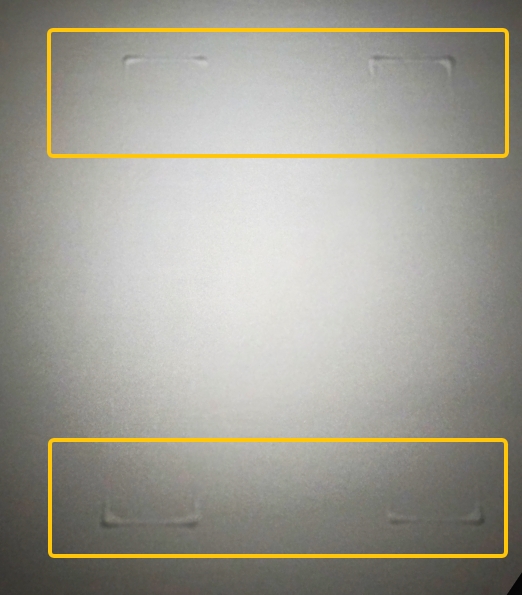
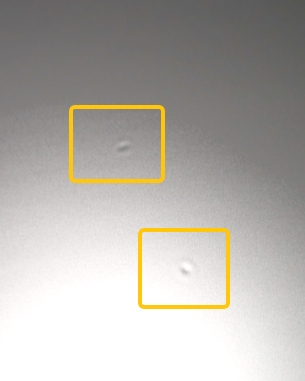
After long-term use of the Smooth PEI Steel Plate, you may find small bubbles, bulges, local protrusions, or dents on the surface.
These phenomena usually manifest as:
- Small circular or irregular protrusions on the PEI build plate surface;
- Slight elasticity felt when pressing the protrusions by hand;
- Bubbles becoming more obvious after heating the heated bed;
- Local deformation near the printing area;
- Slight dents on the build plate surface.
- If the build plate surface is torn or deformed when removing the model, please jump to Issue 2: Tearing or Deformation.
The Smooth PEI Steel Plate uses a flexible PEI film on the surface to provide good printing adhesion. The PEI film is prone to surface damage when subjected to large pulling forces, external impacts, or scraping with hard objects.
Click here to view more descriptions
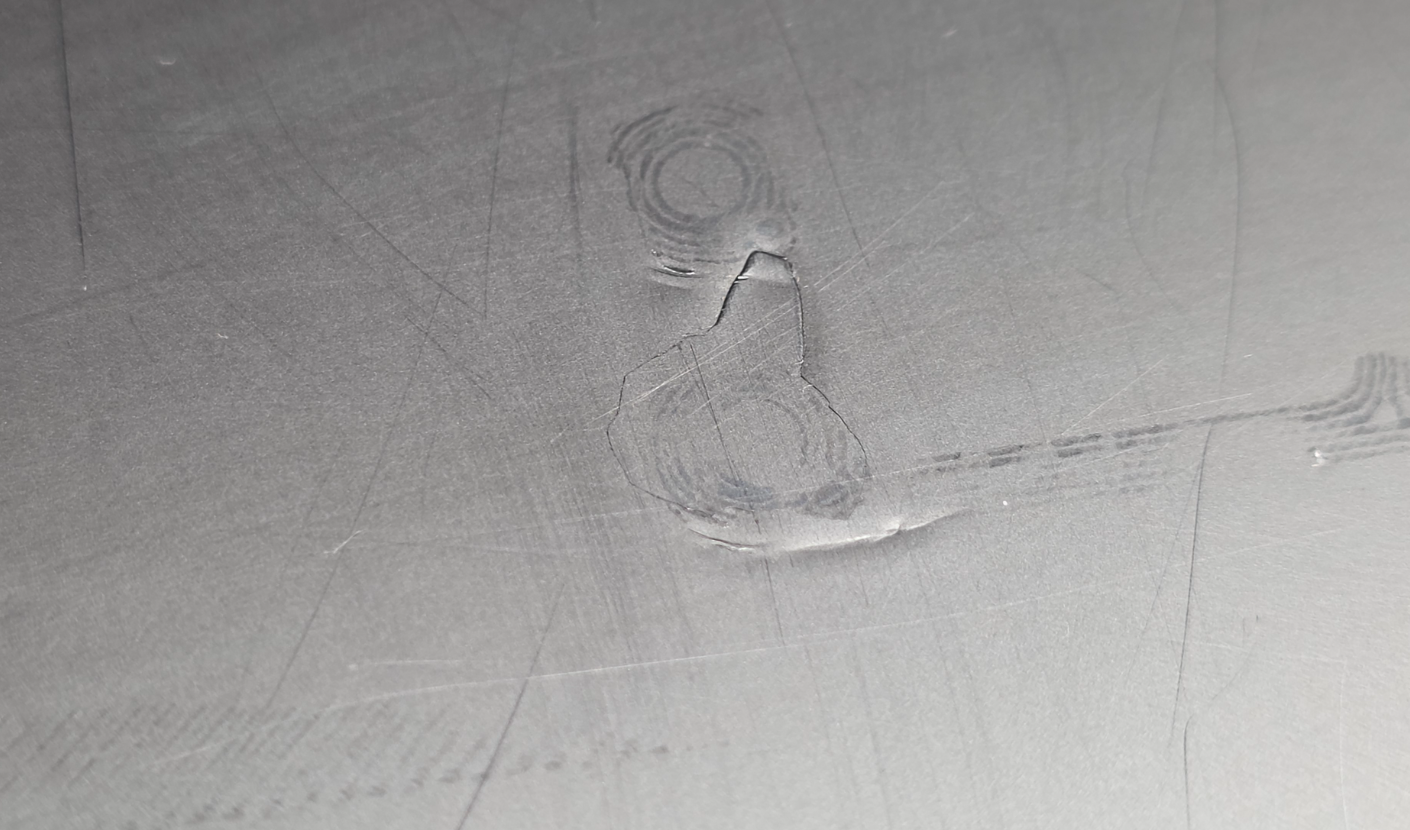
When removing a model from the Smooth PEI Steel Plate, you may find:
- Scratches or local damage on the PEI build plate surface;
- White stretch marks on the PEI build plate surface;
- Local deformation of the PEI film;
- Marks resembling "tearing" in the printing area.
- If model traces remain on the build plate surface, please jump to Issue 3: Model Traces.
Minor model traces on the Smooth PEI Steel Plate surface are normal signs of use and do not affect the normal function of the build plate.
Click here to view more descriptions
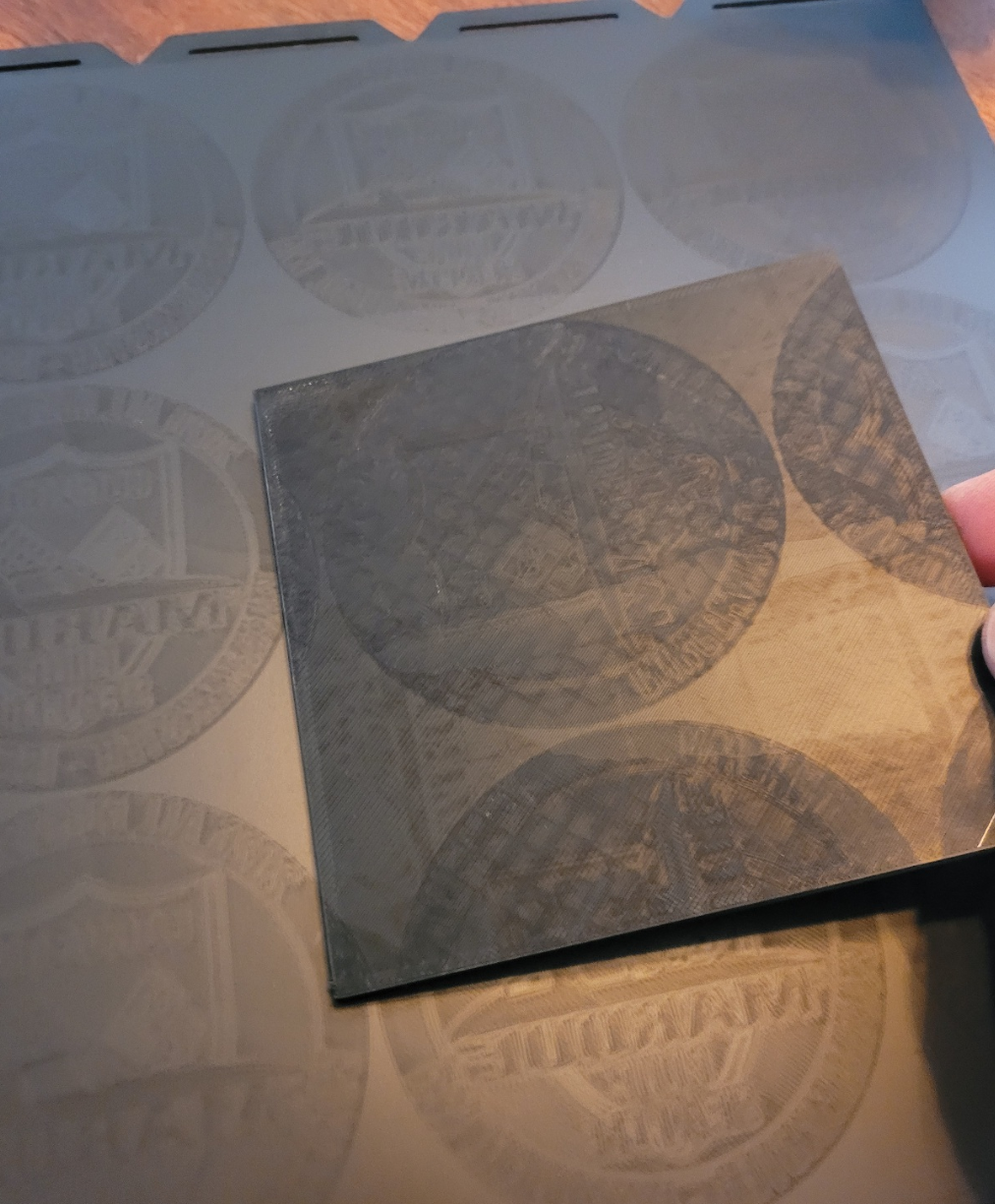
After multiple prints using the Smooth PEI Steel Plate, you may find outlines, textures, light or dark marks, or gloss changes matching the bottom shape of the model.
Outlines of the circular model area can be observed on the build plate surface; these marks usually correspond to the bottom shape of the printed model.
¶ 📋 Quick Info Card
- Difficulty: ⭐⭐☆☆☆
- Estimated Time: 10-25 minutes
¶ 🔁 Troubleshooting Flowchart
¶ 🛠️ Troubleshooting Steps
¶ Issue 1: Bubbles or Pits
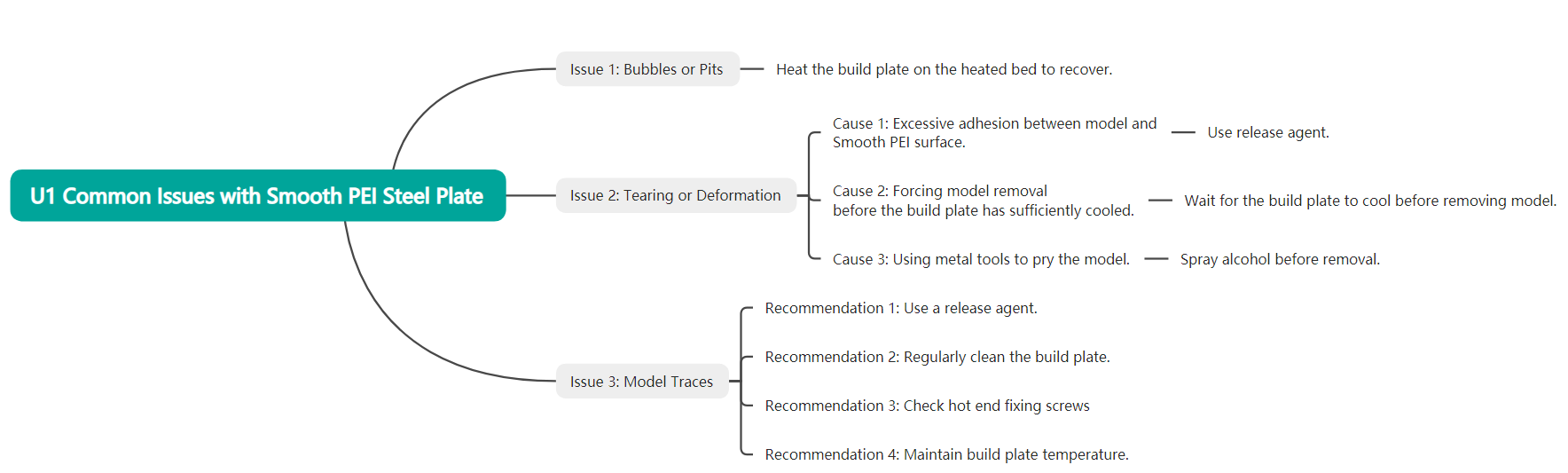
In general, small bubbles, bulges, local protrusions, or dents appearing on the build plate surface with use are normal phenomena and will not affect subsequent printing quality or the normal use of the build plate.
However, you can follow the steps below to heat the build plate on the heated bed in an attempt to recover the bulges and pits.
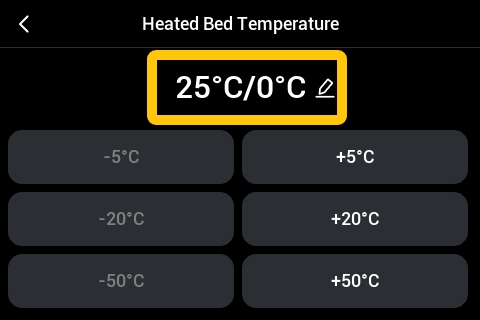
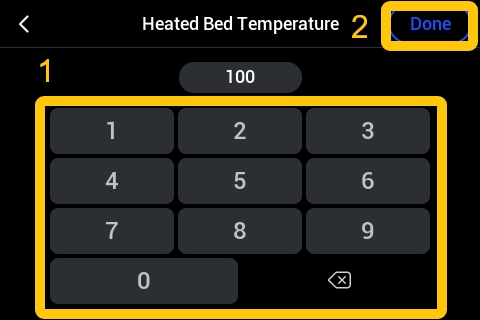
¶ Step 1: Heat the heated bed to 100℃
During heating, do not touch the build plate to prevent burns.
- Place the build plate on the heated bed with the bulged side facing down.
- Turn on the U1 power.
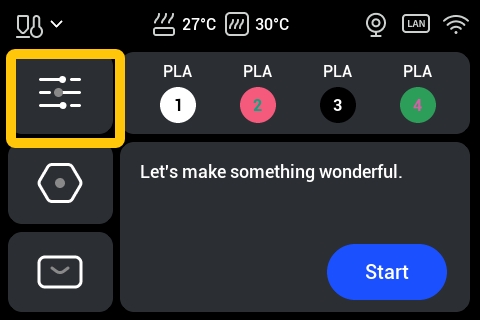
- From the Home interface of the U1 touchscreen, tap
Control>Control.
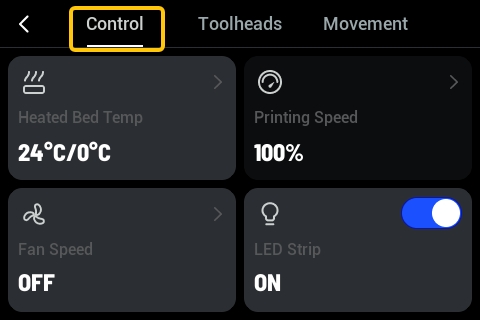
- On the
Controlpage, tapHeated Bed Temp.
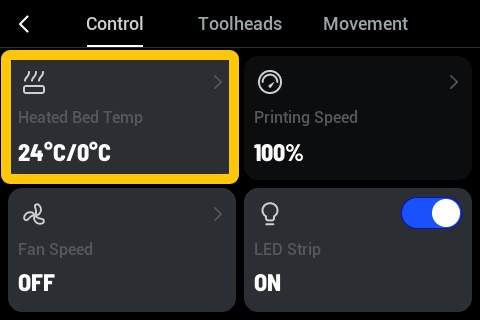
- On the Heated Bed Temperature page, tap the temperature display area; set the target temperature to 100℃ and tap
Done.
- Wait for 20-30 minutes.
During the waiting process, do not touch the build plate to prevent burns.
¶ Step 2: Check the surface
During inspection, do not touch the build plate to prevent burns. If you need to touch it, set the bed temperature to 0℃, wait and confirm that the build plate has cooled to room temperature before touching the surface.
- After waiting for 20-30 minutes, check the build plate surface again for bulges and pits.
- If the bulges and pits have recovered, you have successfully resolved the issue;
- If only slight bulges and pits remain, they will recover on their own during subsequent use, and slight dents will not affect the normal use of the build plate or the printing quality;
- If severe bulges and pits that affect printing quality and use still exist, please contact technical support for further assistance.
¶ Issue 2: Tearing or Deformation
The Smooth PEI Steel Plate surface uses a coating. To extend the service life of the coated build plate and avoid damage, please read the Build Plate Guide carefully and follow its instructions before using the Smooth PEI Steel Plate.
¶ Cause 1: Excessive adhesion between model and Smooth PEI surface
When printing materials with strong adhesion to the Smooth PEI Steel Plate (such as PETG, TPU, ABS), glue stick or liquid glue must be used as a release agent.
Before printing, please read the Build Plate Guide to check whether a glue stick, liquid glue, etc., is required as a release agent when using different filaments with the Smooth PEI Steel Plate.
When using official Snapmaker filaments, you can also refer to the official TDS (Technical Datasheet) or User Guide for the filament to view heated bed preparation recommendations.
¶ Cause 2: Forcing model removal before the build plate has sufficiently cooled
- After printing is complete, wait for the bed temperature to drop to room temperature before removing the model.
¶ Cause 3: Using metal tools to pry the model
The Smooth PEI surface is soft. Please avoid using sharp metal tools to directly scrape the printing area.
- If the model is difficult to remove, you can spray alcohol around the model, wait for the alcohol to penetrate to the bottom of the model, and then attempt to remove it.
¶ Issue 3: Model Traces
In general, minor model traces on the Smooth PEI Steel Plate surface are normal signs of use and do not affect the normal function of the build plate.
The following situations are usually natural changes occurring during long-term printing and use and are not quality issues:
(1) Model outlines appearing on the build plate surface;
(2) Changes in color or gloss in local areas of the build plate;
(3) Visual differences between the printing area and unused areas of the build plate;
(4) Slight dents or texture changes on the build plate surface.
You can also follow the recommendations below to minimize the appearance of model traces.
¶ Recommendation 1: Use a release agent
When printing materials with strong adhesion to the Smooth PEI Steel Plate (such as PETG, TPU, ABS), use a glue stick or liquid glue as a release agent.
Before printing, you can read the Build Plate Guide to check whether a glue stick, liquid glue, etc., is required as a release agent when using different filaments with the Smooth PEI Steel Plate.
When using official Snapmaker filaments, you can also refer to the official User Guide for the filament to view heated bed preparation recommendations.
¶ Recommendation 2: Regularly clean the build plate
Please refer to How to clean your PEI steel sheet and clean the build plate regularly.
¶ Recommendation 3: Check hot end fixing screws
If the hot end fixing screws are loose, the distance between the nozzle and the build plate may be too small, which may cause traces on the build plate.
- Refer to the disassembly steps in the U1 hot end replacement guide to find and tighten the hot end fixing screws, ensuring they are not loose.
¶ Recommendation 4: Maintain build plate temperature
During the printing process, maintain a higher temperature for the build plate, for example:
- PLA: approx. 50–65 ℃;
- PETG: approx. 70–80 ℃;
- ABS/ASA: higher temperatures.
¶ 📚 Related Resources
¶ 💬 Reach out to Snapmaker Support
After following the troubleshooting steps, if you find it difficult to resolve your issue, kindly submit a support ticket through https://snapmaker.formcrafts.com/u1-troubleshooting-request and share your troubleshooting results with some pictures/videos.
Our dedicated support team will be more than willing to assist you in resolving the issue.