¶ 💡 Compatibility
This guide applies to the following machine. Please note when referencing:
- Machine model: U1
¶ ⏰ When to Use This Guide
If the spool claw assembly on the U1 printer shows any of the following issues, refer to this guide for initial troubleshooting and reset instructions:
- The spool claw assembly accidentally comes loose from the module while installing or removing the filament holder.
Please remove the filament holder properly. Refer to U1 How To Remove The Filament Holder for detailed instructions to avoid damaging components due to improper operation.
- External pulling force or incorrect installation causes the filament holder to lose support for the spool. When the filament holder falls off, the spool claw may become noticeably loose or misaligned.
¶ 📋 Quick Info Card
- Difficulty: ⭐☆☆☆☆ (Easy)
- Estimated Time: 5 minutes
¶ 🔁 Troubleshooting Flowchart
¶ 🔍 Quick Diagnosis
Which situation are you experiencing? When the spool claw has detached, first check the condition of the internal spring clip:
- If the entire spool claw assembly has detached but the spring clip remains in place → Go to Scenario 1
- If the spring clip is loose, displaced, or has come off → Go to Scenario 2
¶ 🛠️ Troubleshooting Steps
¶ Scenario 1: Spring Clip in Normal Position
¶ Description
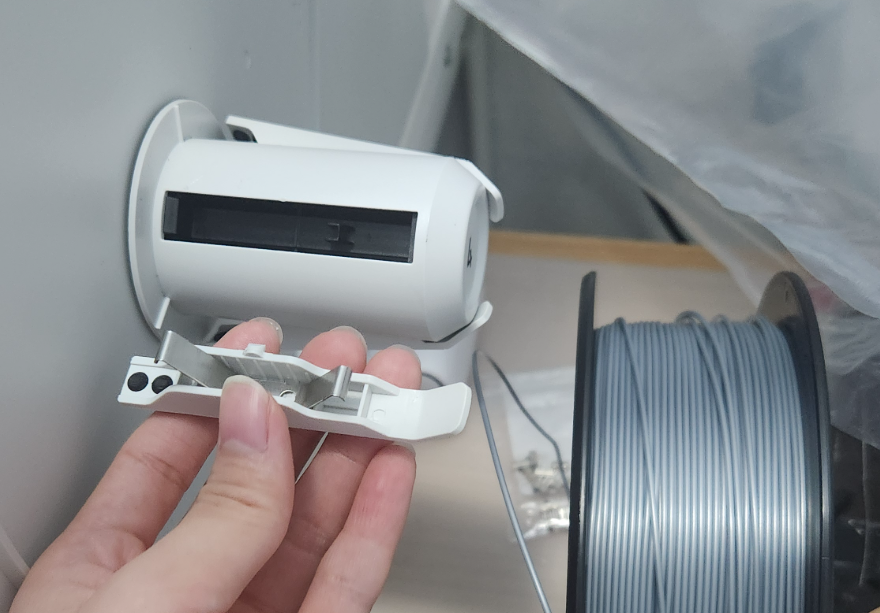
The spool claw assembly has fully detached, but the internal spring clip remains securely installed inside the filament holder. In this case, the spool claw can be reset manually.
¶ Solution
- Tilt the spool claw assembly at a slight angle, and align both ends of the spring clip with the corresponding slots on the filament holder.
- Apply steady pressure to the spool claw until the white positioning clips on both sides are fully pressed into the filament holder.
- Hold the filament holder firmly and repeatedly squeeze and release the spool claw using your fingers. If the spool claw presses smoothly and returns automatically without resistance or sticking, the reset has been completed successfully.
- Reinstall the filament holder onto the machine and perform a functional check (See Verification for more details) to confirm that the reset spool claw assembly operates normally.
¶ Scenario 2: Spring Clip Displaced or Detached
¶ Description
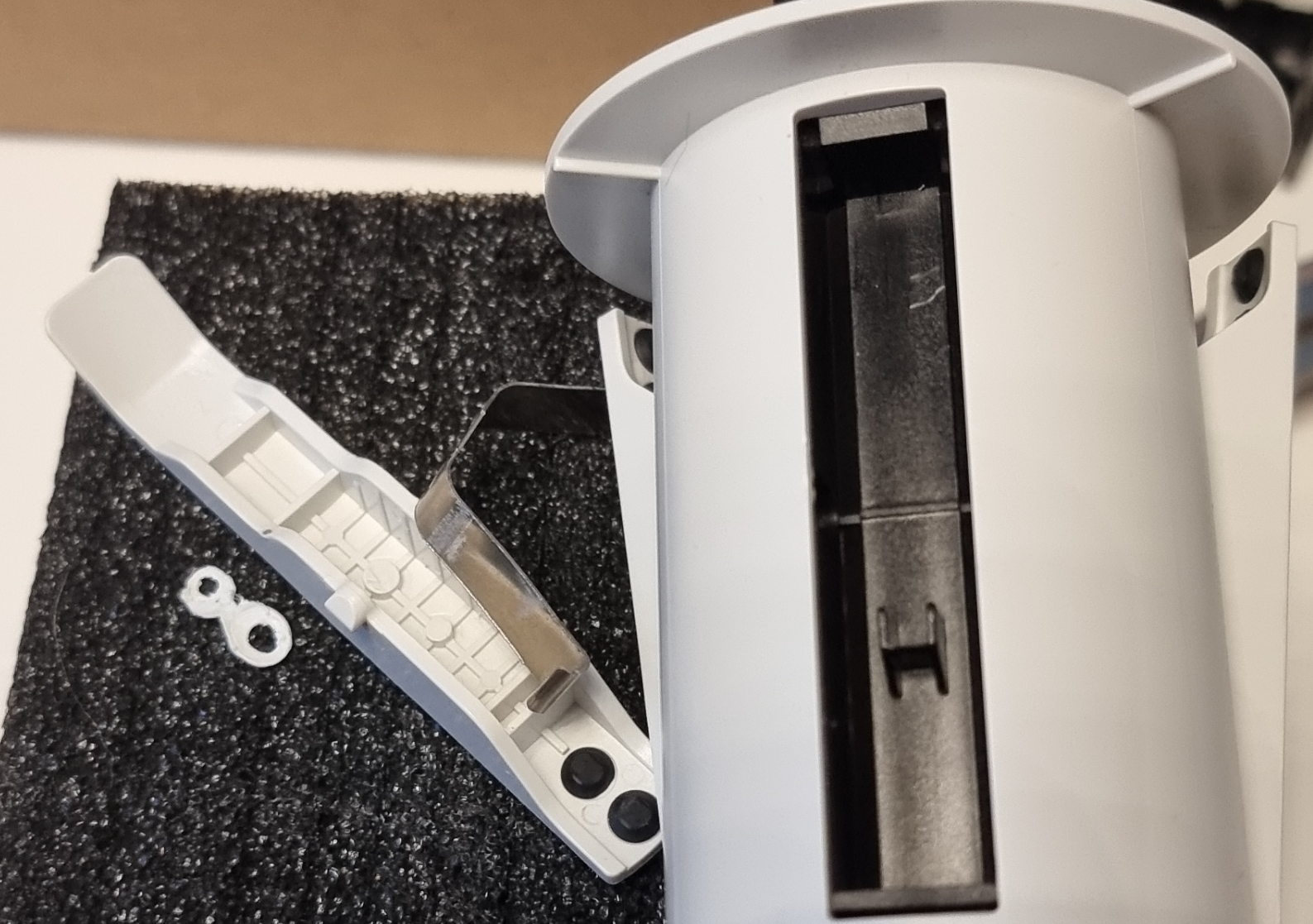
If the spool claw assembly shows structural damage, or if the spring clip has been displaced or has come off, this indicates that the filament holder has suffered physical damage and cannot be repaired using standard reset procedures.
¶ Solution
- Please submit a support ticket. To help us process your request more efficiently, we recommend that you include the following information:
- Clear photos or videos showing the damaged area of the spool claw assembly;
- A brief description of the troubleshooting steps you have already taken (for example, attempting a reset without success).
Based on the information you provide, our technical support team will arrange a replacement filament holder for you.
- After receiving the replacement filament holder, install it correctly on the machine and perform a functional check (See Verification for more details) to confirm that it operates normally.
¶ ✅ Verification
¶ 1. Install the Filament Holder
Refer to the U1 Quick Start Guide (See Chapter 5, “Installation”) or the U1 Video Guide: Machine Unboxing & Assembly (V2.0) to reinstall the filament holder correctly on the printer.
¶ 2. Filament Feeding Test
Run the automatic loading process and observe whether the filament holder feeds the filament smoothly into the filament tube.
- If the test passes, the spool claw function has been fully restored and the printer is ready for normal use.
- If any abnormal behavior occurs, return to the troubleshooting steps or reach out to Snapmaker support.
¶ 📚 Related Resources
- U1 How To Remove The Filament Holder
- U1 Quick Start Guide
- U1 Video Guide: Machine Unboxing & Assembly (V2.0)
- Automatic Loading
¶ 💬 Reach out to Snapmaker Support
After following the troubleshooting steps, if you find it difficult to resolve your issue, kindly submit a support ticket through https://snapmaker.formcrafts.com/u1-troubleshooting-request and share your troubleshooting results with pictures or videos. Our dedicated support team will be more than willing to assist you in resolving the issue.