¶ 💡 Compatibility
This guide applies to the following machine and software. Please note when referencing:
- Machine model: U1
- Software: Latest firmware and Snapmaker Orca software installed.
¶ ⏰ When to Use This Guide
When during printing, the prime tower shifts or falls over during printing. Partial and complete failures are covered in this article.
¶ 📋 Quick Info Card
- Difficulty: ⭐☆☆☆☆ (Easy)
- Estimated Time: 15 minutes
- Required Skills: no special skills requiered.
¶ 🔁 Troubleshooting Flowchart
¶ 🔍 Quick Diagnosis
Which situation are you experiencing?
- Bed adhesion is good, same type of filament is used (e.g. PLA with PLA) → Go to Strategy 1
- Multimaterial print (different filament types in one print) → Go to Strategy 2
- Bed adhesion issues → Go to Strategy 3
¶ ⚠️ Important Notes
Examine the failed prime tower to determine the most probable failure cause. Timelapse is a great tool in this case. Apply one corrective action at a time to accurately identify the root cause.
¶ 🛠️ Troubleshooting Steps
¶ Strategy 1: Optimize the Prime Tower Geometry
¶ Step 1. Optimize wipe tower size
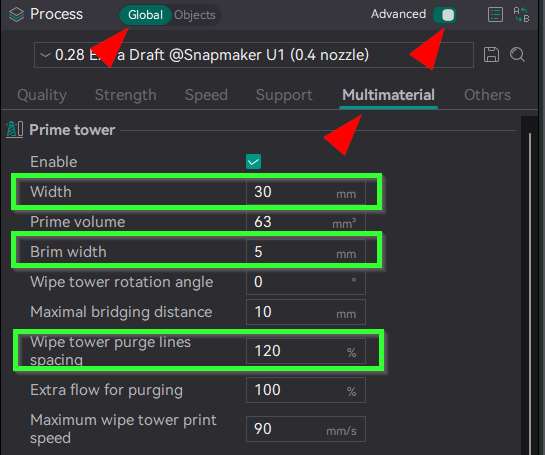
Increase one or a combination of the parameters highlited in the screenshot below, to match your requerments.
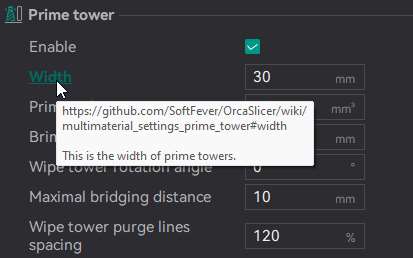
You can hover over or click the parameter to show what it is responsible for.
Key Adjustable Parameters:
- Width: Adjust the width to keep the tower as square-shaped as possible, to optiomze its footprint.
- Brim Width: Increasing the brim width improves bed adhesion.
- Purge Line Spacing: Increases the volume of the tower.
¶ Step 2. Use RIB style for the prime tower
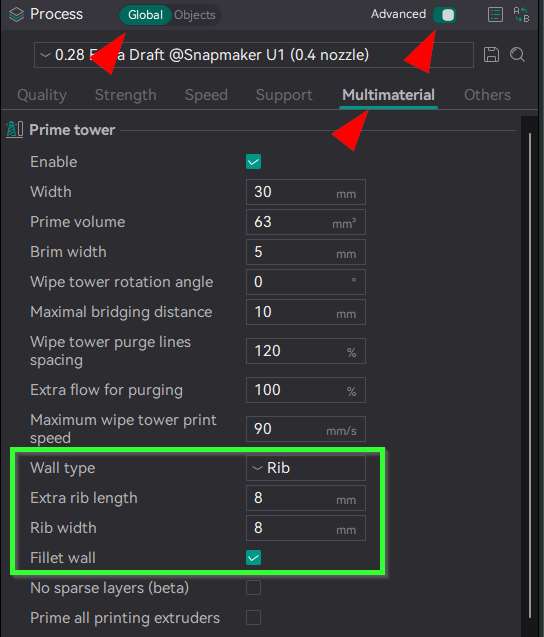
When using the wipe tower in the new software version, it is recommended to select Rib for the wall type. This can significantly improve the tall tower's resistance to tipping and reduce the risk of collapse caused by nozzle collisions.
Key Adjustable Parameters:
- Rib Length: Appropriately increasing this allows the tower to occupy a larger footprint on the build plate, making the base more stable.
- Rib Width: Do not use small values; ensure there is sufficient contact area between the outer wall and the internal infill to enhance overall strength.
¶ Strategy 2: Use Designated Filament for Prime Tower Shell to Prevent Breakage
¶ Step 1. Set desired filament for outer shell
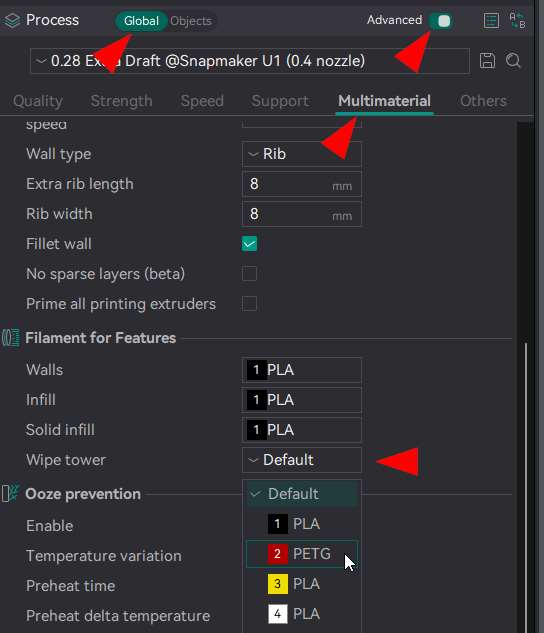
When adhesion between different materials is poor (e.g., PLA + PETG), the entire tower is prone to layer separation (delamination) or breakage at the material interface. You can specify the filament used for the wipe tower shell.
¶ Strategy 3: Improve Adhesion Between Prime Tower and Heat Bed
¶ Step 1. Build Plate Maintenance
Confirm the build plate type is set correctly and that the plate is clean (wash with warm water + dish soap. Wipe dry.). A single fingerprint can affect bed adhesion.
¶ Step 2. Bed Temperature Settings
Appropriately increase the heat bed temperature and lower the cooling fan speed for the first few layers to enhance adhesion.
¶ Step 3. Environment
If the ambient temperature is low or if printing materials prone to warping (ABS/ASA/PA, etc.), try to print in an enclosed printer and reduce cooling.
¶ ✅ Verification
- Successful print with stable prime tower would indicate that applied changes fixed the root cause. Congratulations!
¶ 📚 Related Resources
- U1 the first layer does not adhere
- U1 first layer printing troubleshooting guide
- How to clean your PEI steel sheet
¶ 💬 Reach out to Snapmaker Support
After following the troubleshooting steps, if you find it difficult to resolve your issue, kindly submit a support ticket through https://snapmaker.formcrafts.com/u1-troubleshooting-request and share your troubleshooting results with some pictures/videos.
Our dedicated support team will be more than willing to assist you in resolving the issue.