¶ Phenomenon Description
- During printing, some devices may produce a “thump” or “bang” sound when the machine performs a fast Z-axis direction change or Z-hop.
- The sound usually resembles a metallic or hard component hitting the plastic base, producing a knocking noise.
¶ Why does this sound occur?
Under the current load and acceleration parameters, the Z motor generates an instantaneous reverse force during fast direction changes. This force is transmitted through the mechanical structure to the plastic base, producing a certain level of noise.
¶ Is this normal?
Yes, this behavior is normal.
This kind of “drumming” sound is generally common to some extent, and may vary between devices. Due to part tolerances and assembly differences, the final sound level may differ.
¶ Suggested Solutions and Mitigation
If the sound is not accompanied by printing abnormalities or Z-axis motion issues, it generally does not affect normal use and can be safely continued. If you want to further reduce or mitigate the sound, try the following measures:
¶ 1. Firmware Update
Please ensure the device firmware has been updated to version 1.1.0 or later.
¶ 2. Check Z Timing Belt Fixing Screws
Please follow the video guide below to check whether the screws on the Z-axis belt tensioner at the bottom of the machine are properly tightened, and then retighten the Z-axis belt.
Watch video guide on YouTube:
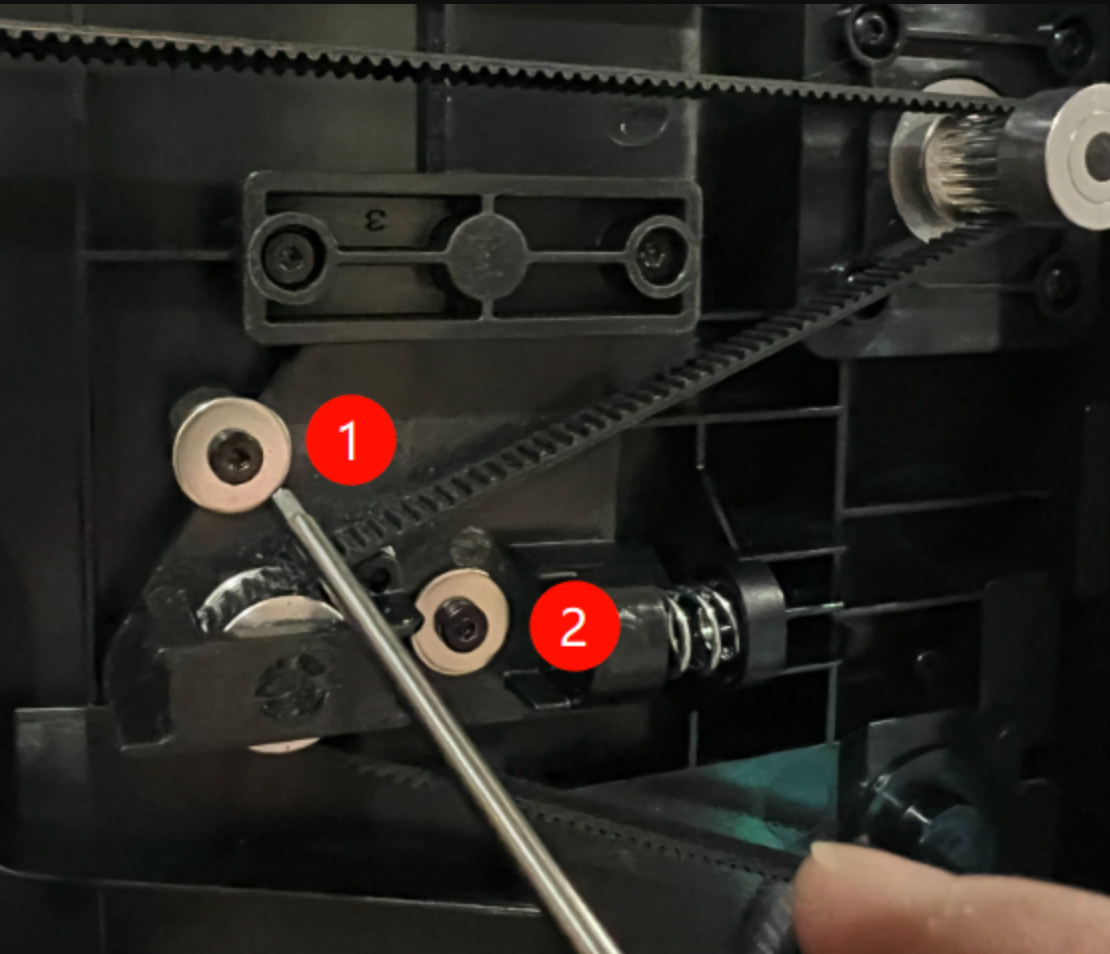
In rare cases, the screw at position ① in the image below may become stripped and cannot be tightened properly. This screw serves only an auxiliary fastening role, while the primary fastening is performed by the screw at position ②. Therefore, looseness of screw ① will not affect normal printer operation. In this situation, simply ensure that screw ② is securely fastened.
If you would like to fix position ①, you may replace the original ST3×8 screw with an ST3×10 self-tapping screw. We apologize for any inconvenience caused and will continue to improve the design in future versions. If you have further questions, please contact Snapmaker support.
¶ 3. Reduce Z-Axis Acceleration
It is recommended to set the Z-axis acceleration to 200 mm/s². The operation steps are as follows:
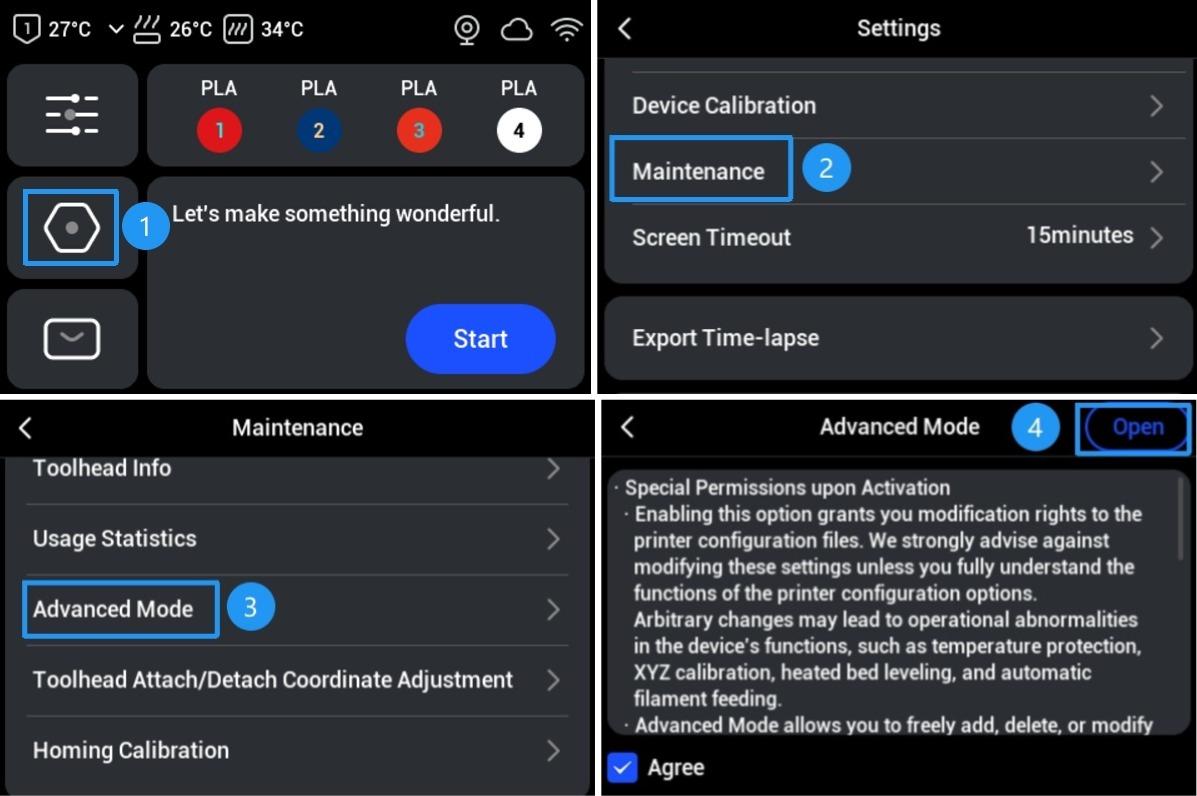
¶ Step 1: Enable Advanced Mode
On the touchscreen, go to Settings > Maintenance > Advanced Mode.
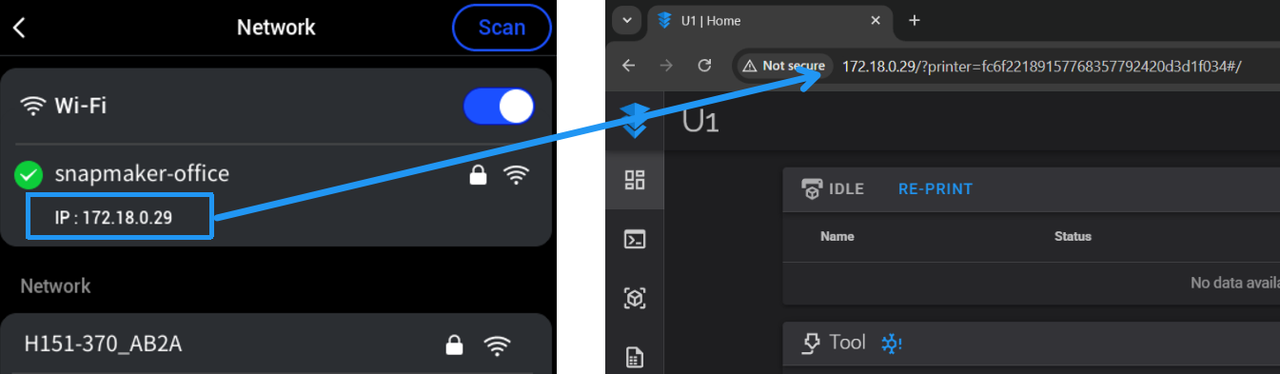
¶ Step 2: Check the machine IP in Settings > Wi-Fi, then enter the IP address in your computer browser.
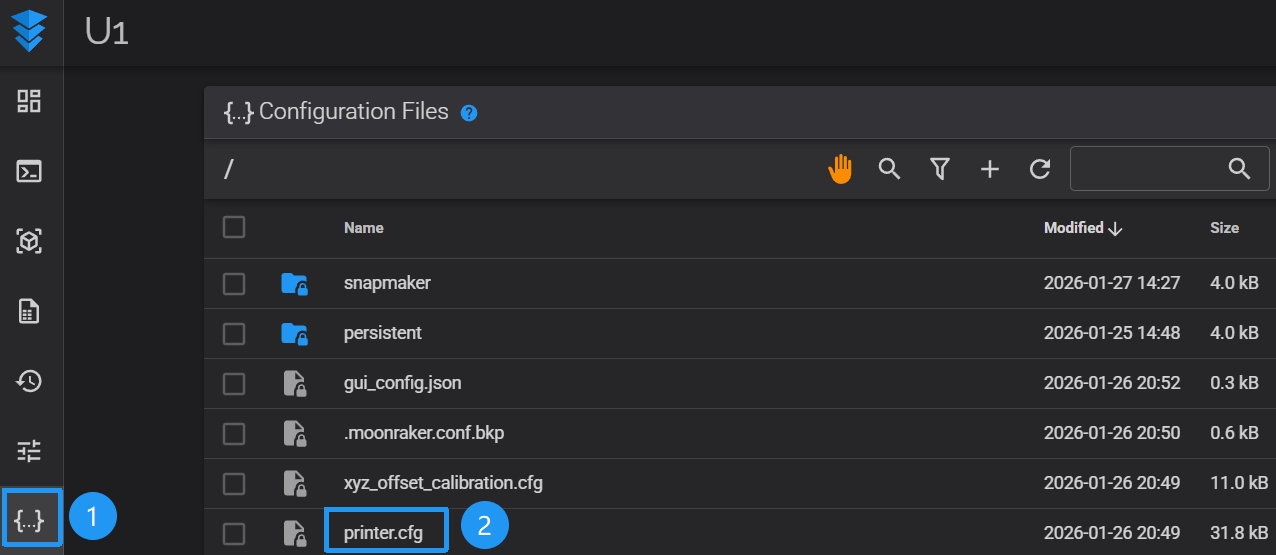
¶ Step 3: On the Fluidd page, click Configuration and locate the printer.cfg file
¶ Step 4: Modify the Z-axis acceleration
You need to modify the following two locations:
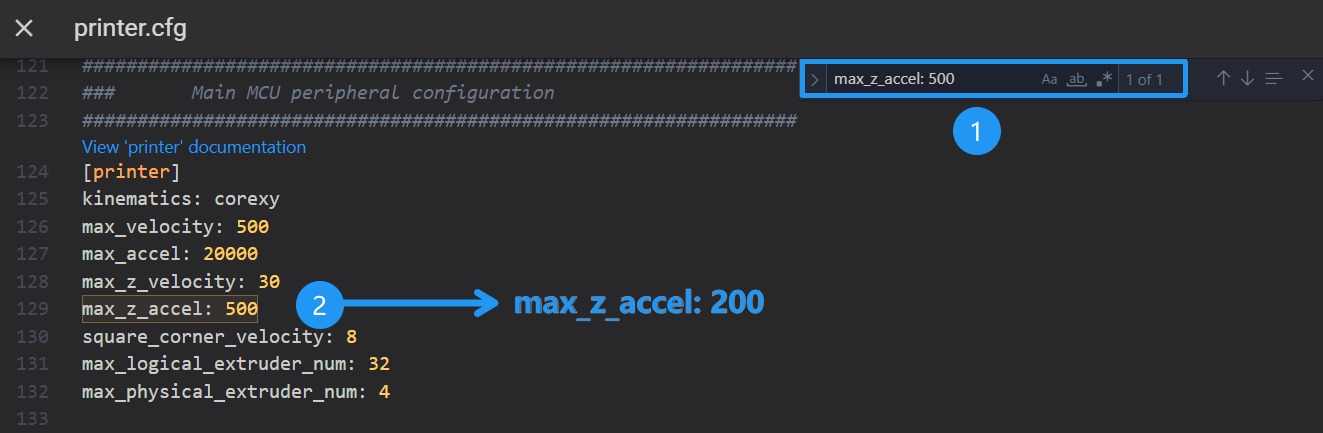
(1) Search for max_z_accel: 500 and change it to max_z_accel: 200
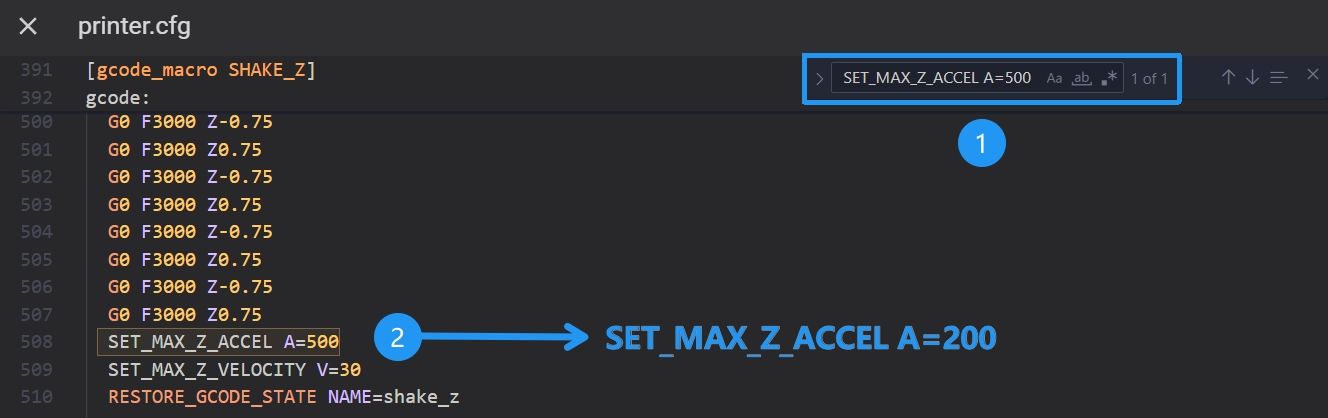
(2) Search for SET_MAX_Z_ACCEL A=500 and change it to SET_MAX_Z_ACCEL A=200
(3) Click SAVE & RESTART in the top-right corner of the Fluidd page to save and restart
You can use keyboard shortcuts to search: Ctrl + F on Windows, Command (⌘) + F on Mac
¶ 4. Adjust Z-Hop Type
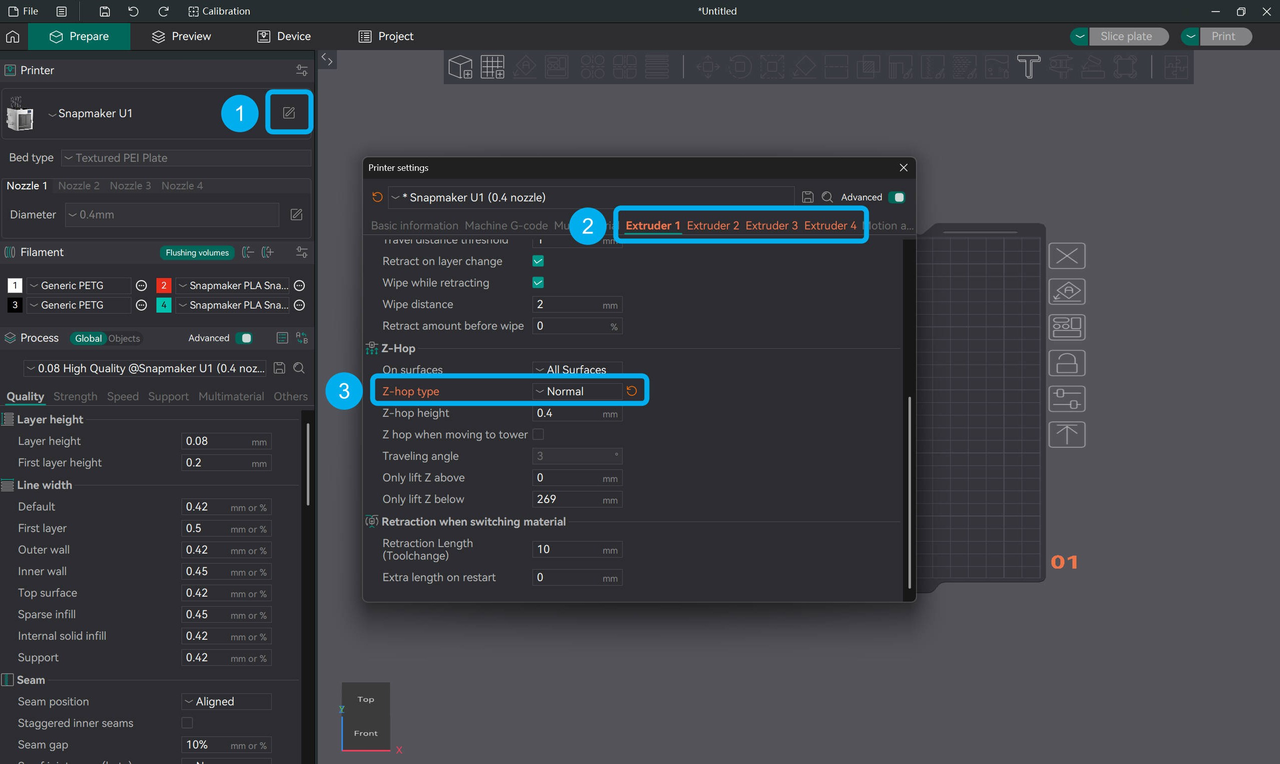
In Snapmaker Orca, change the Z-hop type for Extruder 1–4 from Auto to Normal.
¶ 5. Lubricate the lead screw
According to the official recommendation, the lead screw should be maintained quarterly. If it is not properly lubricated, the noise may become more noticeable. You can refer to the maintenance guide below for detailed instructions.
¶ Reach out to Snapmaker Support
If you still have any questions about this issue, please kindly submit a support ticket through the link below https://snapmaker.formcrafts.com/u1-troubleshooting-request
We will be happy to assist you.