¶ Download Link
When using firmware V1.3.0, it is recommended to use it with Snapmaker Orca V2.3.1 (or later), or Snapmaker App V2.3.2 (or later).
¶ New Features
- Added support for multiple nozzle diameters (0.2mm / 0.4mm / 0.6mm / 0.8mm).
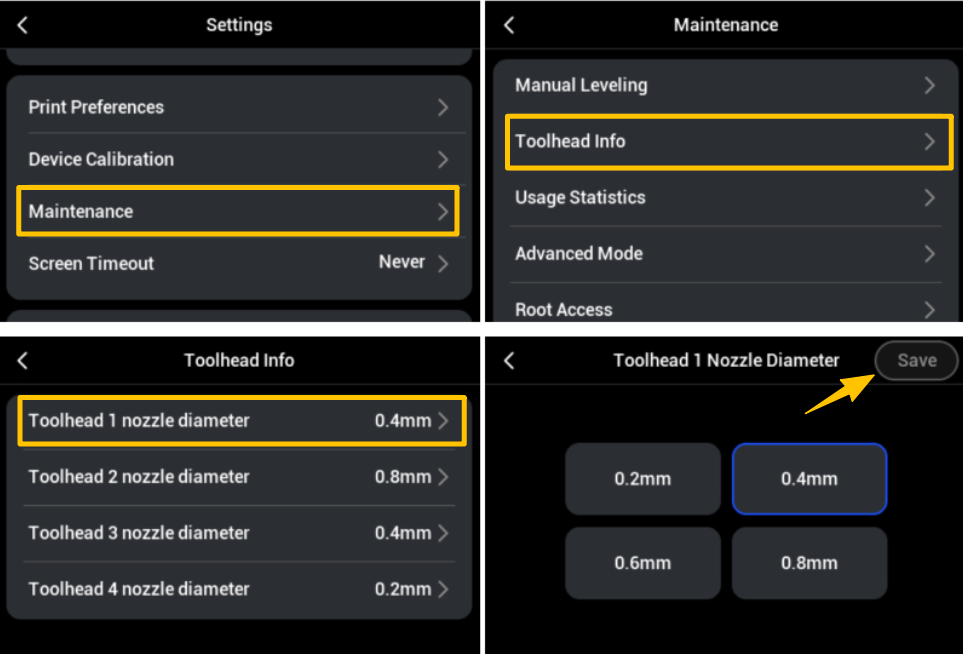
- Nozzle information is now editable. On the touchscreen, navigate to Settings >
Maintenance>Toolhead Info> Modify the corresponding nozzle diameter >Save.
- After replacing the nozzle, please perform Multi-toolhead Offset Calibration and Heated Bed Leveling to ensure print accuracy.
- Added nozzle usage rules. To prevent printing anomalies caused by improper configuration of different nozzles, the following safety restrictions are included:
- Auto-refill is prohibited between nozzles of different diameters.
- The nozzle diameter specified in the G-code file cannot be mapped to the toolhead with a different diameter nozzle.
- Enhanced network management, supporting connection to hidden SSID networks.
¶ Bug Fixes
- Fixed an issue where the "Unedited Filament" error message persisted.
- Optimized the communication protocol in Cloud Mode to resolve control issues caused by weak network environments. For example, some users encountered situations such as receiving unexpected parameter configuration commands during printing or experiencing delays in receiving print tasks.
¶ Improvements
- Updated the AI defect detection model.
- Optimized Pogo Pin continuity detection logic to prevent false detections from pausing print tasks.
- Improved extrusion flow calibration and updated built-in parameters.