¶ Compatibility
This article applies to the following model and module. Please take note when referencing:
Model: U1
¶ Issue Description
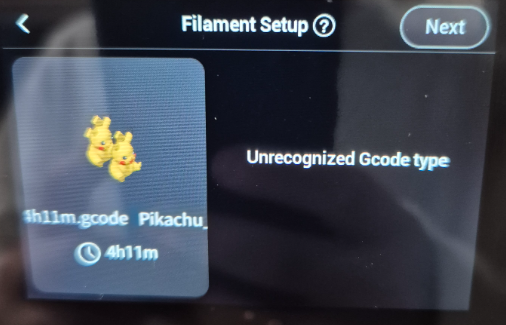
When sending a print file from Snapmaker Orca to the Snapmaker U1, the following error appears on the touchscreen:
“Unrecognized Gcode type”
¶ Possible Causes
The Gcode error is caused by incorrect filament settings during slicing. The filament type may be incompatible with the U1, or the Density value is set to 0 (0 is not a valid value).
¶ Troubleshooting Steps
- Open the 3MF project file in Snapmaker Orca
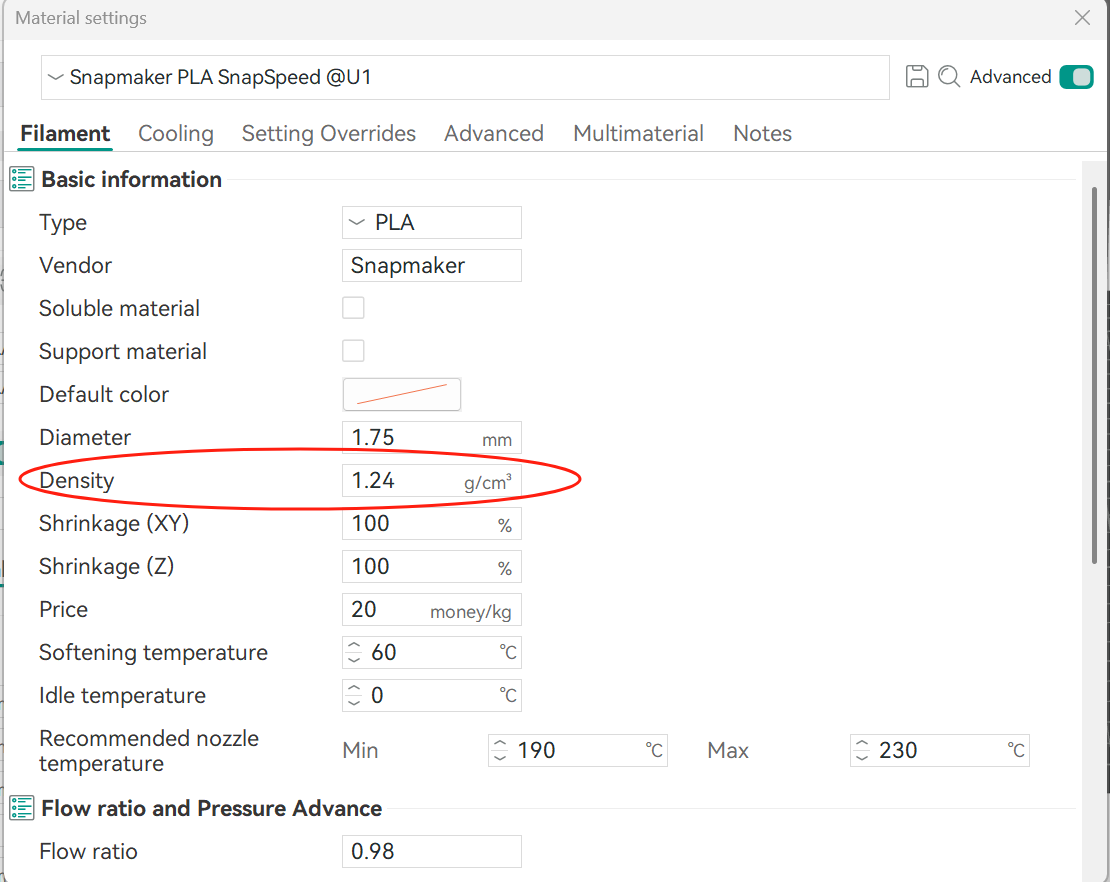
- Check the Density parameter in the filament profile. If Density is set to 0, change it to the correct value (for example, Snapspeed PLA (RFID) should be 1.24 g/cm³)
- Re-slice the model and send it to the printer again
¶ Reach out to Snapmaker Support
After following the troubleshooting steps, if you find it difficult to resolve your issue, kindly submit a support ticket through https://snapmaker.formcrafts.com/u1-troubleshooting-request and share your troubleshooting results with some pictures/videos.
Our dedicated support team will be more than willing to assist you in resolving the issue.