¶ Download Link
¶ New Features
- Integrated new features from OrcaSlicer since V2.2.0. Snapmaker Orca 2.2.1 is now aligned with the official OrcaSlicer V2.3.1 release.
- OrcaSlicer v2.3.0-beta Release
- OrcaSlicer v2.3.0-beta2 Release
- OrcaSlicer V2.3.0 Release Candidate
- OrcaSlicer V2.3.0 Official Release
- OrcaSlicer V2.3.1-alpha Release
- OrcaSlicer v2.3.1 beta Release
- OrcaSlicer v2.3.1 Official Release
- Added error reporting functionality during operation.
- Introduced the User Experience Improvement Program.
- Adapted to the device's AI detection functionality.
- Added network testing functionality.
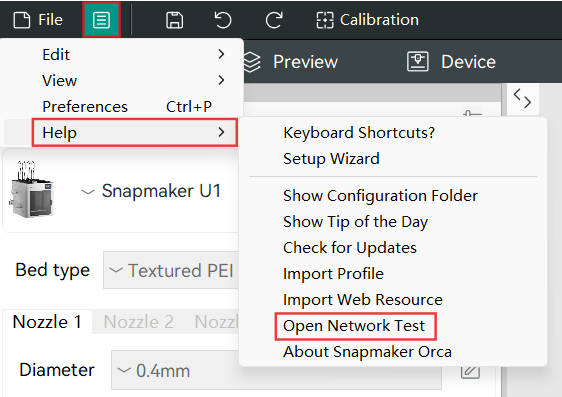
- The network testing tool is now available to help diagnose the connection: Open the feature panel > click Help > Open Network Test.
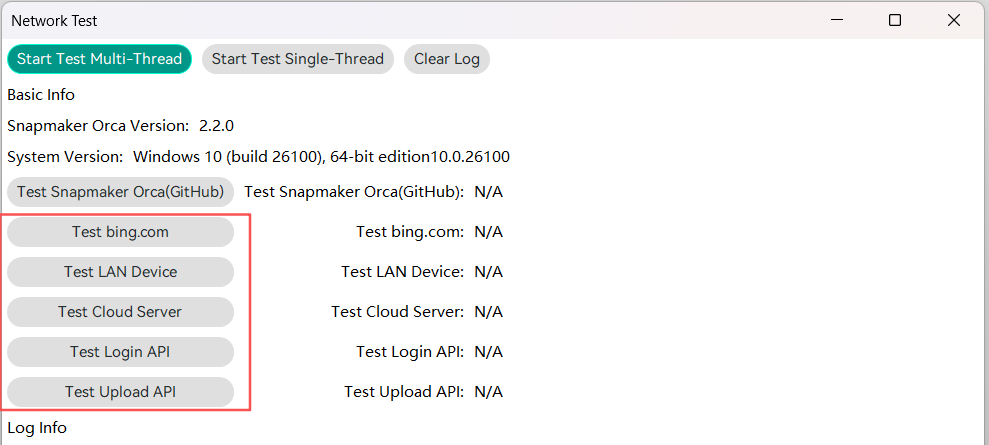
| Feature | Description | Instruction |
|---|---|---|
| Test LAN Device | Test communication with the cloud server in Cloud mode. If device connection issues occur, please send the screenshot of the test results to Technical Support. |
1. Ensure the device is connected via LAN mode. 2. Enable this feature. 3. Enter the device's IP address. 4. Click Confirm to start the test. 5. Review the log information. |
| Test Cloud Server | Test communication with the cloud server in Cloud mode. If device connection issues occur, please send the screenshot of the test results to Technical Support. |
1. Ensure the device is connected via Cloud mode. 2. Enable this feature. 3. Review the log information. |
| Test Login API | Test the login interface. If you encounter login issues, use this feature to run a test. |
1. Enable this feature. 2. Review the log information. |
| Test Upload API | Test the file upload interface. If you encounter issues when uploading print files to the device, use this feature to run a test. |
1. Enable this feature. 2. Review the log information. |
¶ Bug Fixes & Improvements
- Optimized the device binding and connection procedures with Snapmaker Orca.
- Enhanced device control under unstable network conditions.
- Improved reliability of slice files uploads under unstable network conditions.
- Refined the interaction experience between the device and the software when switching device binding modes (Cloud mode / LAN mode) and logging out on the touch screen.
- Enhanced the operation experience when enabling the camera.
- Improved accuracy of estimated print time under specific conditions.
¶ Known Issues
- The network testing feature may require optimization in certain scenarios.
- The Linux version is not yet fully compatible.